
Building a threadiverse community platform
In this tutorial, we will build a small threadiverse-style community platform that federates with Lemmy, Mbin, and NodeBB. The server we build will host federated communities that remote users can subscribe to, threads posted inside those communities, and threaded replies to those threads. We will use Fedify as the ActivityPub framework and Next.js as the web framework.
This tutorial focuses on how to use Fedify rather than on Next.js itself. If you have never used Next.js before, don't worry: we'll only touch the parts of it that we need, and in a very shallow way.
If you have any questions, suggestions, or feedback, please feel free to join our Matrix chat space or GitHub Discussions.
Target audience
This tutorial is aimed at readers who want to learn how to build a community-centric ActivityPub application, something shaped like Lemmy rather than like Mastodon.
We assume that you have experience creating web applications with HTML and HTTP, that you understand command-line interfaces, JSON, and basic JavaScript. You don't need to know TypeScript, JSX, SQL, ORMs, ActivityPub, Next.js, or Fedify. We'll teach you what you need to know about each of these as we go along.
You don't need prior experience building ActivityPub software, but we do assume that you have used at least one piece of threadiverse software such as Lemmy, Mbin, NodeBB, or Piefed. That way you already have a mental picture of the kind of product we are building.
If you are looking for a tutorial that builds a Mastodon-style microblog (actor- and timeline-centric) instead, see Creating your own federated microblog.
Goals
We will build a multi-user community platform whose local users can host federated communities and subscribe to remote ones. It will include the following features:
- Users can sign up and log in with a username and password.
- Local users are federated as
Personactors: other fediverse software can look them up by their handle. - Local users can create and host federated communities. A community is federated as a
Groupactor with its own inbox, outbox, and followers collection. - Users can subscribe to a community on any threadiverse-compatible server (Lemmy, Mbin, another Fedify-based app, and so on).
- Users can unsubscribe from a community.
- Users can create a text thread inside a subscribed community. A thread is federated as a
Create(Page)activity addressed to the community. - When a local community receives a thread, it redistributes that thread to all of its subscribers as an
Announceactivity. This is the pattern threadiverse servers use to fan discussion out to every follower of a community. - Users can reply to a thread or to another reply. Replies are federated as
Create(Note)activities. - Users can up-vote (
Like) or down-vote (Dislike) any thread or reply. The community redistributes these votes the same way it redistributes threads and replies. - Users see a front page that lists recent threads from every community they subscribe to.
To keep the tutorial focused on federation mechanics, we leave out the following features:
- Link threads (threads whose body is a URL instead of prose).
- Thread and reply editing, deletion, and
Tombstone. - Moderator roles, removals, bans, and reports.
- Ranking algorithms such as Hot or Active.
- Private communities.
- Media uploads.
- Direct messages.
After finishing the tutorial you are encouraged to add whichever of these you want; they're all good practice.
The complete source code is available in the GitHub repository, with commits separated according to each implementation step for your reference.
Setting up the development environment
Installing Node.js
Fedify supports three JavaScript runtimes: Deno, Bun, and Node.js. Next.js itself runs on Node.js, so we'll use Node.js here as well.
You need Node.js version 22.0.0 or higher. There are several installation methods; pick whichever is most convenient. Once Node.js is installed you should have access to the node and npm commands:
node --version
npm --version
Installing the fedify command
To scaffold a Fedify project we'll use the fedify command. There are several installation methods; the simplest is to install it as a global npm package:
npm install -g @fedify/cliCheck that it works:
fedify --versionMake sure the version number is 2.1.10 or higher. Older versions of the CLI don't know how to scaffold a Next.js 16 project, and 2.1.10 is the first release that ships Lemmy's JSON-LD context as a preloaded document, which this tutorial's Lemmy-interop chapter relies on.
fedify init to initialize the project
Pick a directory to work in. In this tutorial we'll call it threadiverse. Run the fedify init command with a few options so it picks all of our choices non-interactively:
fedify init -w next -p npm -k in-memory -m in-process threadiverseThe command scaffolds a Next.js App Router project that already knows how to serve ActivityPub. The options mean:
-w next: integrate with Next.js using@fedify/next.-p npm: usenpmas the package manager.-k in-memory: keep Fedify's key–value cache in memory (good enough for local development). We'll swap in a persistent store in the Next steps chapter.-m in-process: run Fedify's background message queue in-process instead of on an external broker (Redis, RabbitMQ, and so on).
After a moment your working directory will contain something like this:
- app/ — Next.js App Router pages and layouts
- layout.tsx — root layout
- page.tsx — home page
- globals.css — global stylesheet
- federation/ — ActivityPub server code
- index.ts — Fedify
Federationinstance
- index.ts — Fedify
- public/ — static assets served as-is
- biome.json — formatter and linter configuration
- logging.ts — logging setup
- middleware.ts — Next.js middleware that hands federation requests off to Fedify
- next.config.ts — Next.js configuration
- package.json — package metadata
- tsconfig.json — TypeScript configuration
As you may have guessed, we're using TypeScript instead of plain JavaScript, so every source file ends in .ts or .tsx instead of .js. TypeScript is JavaScript with type annotations, and Fedify leans heavily on those types to guide you into writing correct ActivityPub code. If you've never used TypeScript before, don't worry: we'll introduce each piece of syntax the first time we use it.
Checking that the dev server runs
Now let's make sure the scaffold actually runs. From inside the threadiverse directory, start the Next.js development server:
npm run devThe dev server will keep running until you press Ctrl+C:
  ▲ Next.js 16.2.4
  - Local:        http://localhost:3000
  - Network:      http://192.168.x.x:3000

 ✓ Starting...
 ✓ Ready in 971ms
Open a new terminal tab and use the fedify lookup command to confirm that the ActivityPub side of the server is responding:
fedify lookup http://localhost:3000/users/testuserYou should see Fedify print out a Person actor with preferredUsername equal to testuser. That placeholder actor comes from the default setActorDispatcher() call that fedify init generated in federation/index.ts. We'll replace it with one backed by a real database in Federating your user.
TIP
The dev server responds to any /users/{identifier} URL with a generic actor whose only information is the identifier itself. That's intentional: it lets you verify that the ActivityPub middleware is wired up correctly before you have any real user data.
If you ever see an EMFILE: too many open files error from Next.js on Linux, you've hit the default fs.inotify.max_user_instances limit. Restarting npm run dev with WATCHPACK_POLLING=true in front of it makes Next.js fall back to polling-based file watching and sidesteps the problem.
Swapping ESLint for Biome
The Next.js scaffold that create-next-app dropped into the project comes with ESLint for linting, while the Fedify side of the scaffold prefers Biome. fedify init tries to accommodate both by shipping them side by side, but that means you have to install two tools that disagree with each other on style. Since Biome can do both the formatting and the linting we need, let's delete ESLint and let Biome run the whole show.
Open biome.json and turn the linter on with the recommended rule set:
{
  "$schema": "https://biomejs.dev/schemas/2.4.12/schema.json",
  "assist": { "actions": { "source": { "organizeImports": "on" } } },
  "formatter": {
    "enabled": true,
    "indentStyle": "space",
    "indentWidth": 2
  },
  "linter": {
    "enabled": true,
    "rules": { "recommended": true }
  },
  "files": {
    "includes": ["**", "!.next", "!node_modules", "!public"]
  }
}
Delete the two ESLint configs:
rm eslint.config.mjs eslint.config.tsIn package.json, drop the eslint, eslint-config-next, and @fedify/lint packages from devDependencies, and rewrite the lint and format scripts so they call Biome instead:
"scripts": {
  "dev": "next dev",
  "build": "next build",
  "start": "next start",
  "lint": "biome check",
  "format": "biome check --write"
},
Then reinstall dependencies so the lockfile reflects the smaller dep tree:
npm installFrom now on you can format and lint the whole project with a single command:
npm run formatRunning it once right now flags two pre-existing issues in the fedify init output:
- app/globals.css uses Tailwind CSS directives (
@theme inline, a dark-mode media query) that Biome's CSS parser does not recognise out of the box, so it emits a parse error and aborts formatting for that file. Ignore it for now; we replace app/globals.css wholesale in the next chapter, which removes every Tailwind-specific line, and the error goes away on its own. - federation/index.ts imports
getLoggerfrom LogTape and assigns the result to aloggerconstant, but nothing ever reads thatlogger. Biome'snoUnusedVariablesrule flags it. Delete the unused import and declaration:
import {
  createFederation,
  InProcessMessageQueue,
  MemoryKvStore,
} from "@fedify/fedify";
import { Person } from "@fedify/vocab";

const federation = createFederation({
  kv: new MemoryKvStore(),
  queue: new InProcessMessageQueue(),
});

federation.setActorDispatcher(
  "/users/{identifier}",
  async (ctx, identifier) => {
    return new Person({
      id: ctx.getActorUri(identifier),
      preferredUsername: identifier,
      name: identifier,
    });
  },
);

export default federation;
We'll add logging back later when there's something worth logging.
Layout and navigation
Every page we build in the rest of the tutorial shares the same shell: a top navigation bar with a brand link, a centered content area underneath it, and a single colour palette. We'll set that up once now so later chapters don't have to re-specify it on every page.
Open app/layout.tsx and replace the create-next-app boilerplate with a minimal root layout:
import type { Metadata } from "next";
import Link from "next/link";
import "./globals.css";

export const metadata: Metadata = {
  title: "Threadiverse",
  description: "A small federated community platform built with Fedify.",
};

export default function RootLayout({
  children,
}: Readonly<{
  children: React.ReactNode;
}>) {
  return (
    <html lang="en">
      <body>
        <nav className="site-nav">
          <div className="inner">
            <Link href="/" className="brand">
              Threadiverse
            </Link>
            <ul>
              <li>
                <Link href="/">Home</Link>
              </li>
              <li>
                <Link href="/communities/new">New community</Link>
              </li>
            </ul>
          </div>
        </nav>
        <main>{children}</main>
      </body>
    </html>
  );
}
NOTE
A root layout in the Next.js App Router is the top-most React tree that wraps every page under app/. Whatever it renders shows up on every route. The children prop is the page for the current URL, rendered in place. We haven't written any pages yet besides the home page, but as soon as we do they'll all inherit this nav bar.
Replace app/page.tsx with a temporary welcome blurb. This is the page rendered at the root URL (/). We'll revisit it in a later chapter and turn it into the subscribed feed once users can follow communities:
export default function Home() {
  return (
    <>
      <h1>Welcome to Threadiverse</h1>
      <p>
        This is a small federated community platform built with Fedify and
        Next.js.  In the next chapters of the tutorial we'll add user
        accounts, communities, threads, replies, and votes.
      </p>
    </>
  );
}
Next, replace the whole contents of app/globals.css with the small stylesheet below. You can copy and paste it verbatim; we won't touch CSS again for the rest of the tutorial:
:root {
  --color-bg: #fafafa;
  --color-surface: #ffffff;
  --color-border: #e5e5e5;
  --color-text: #1a1a1a;
  --color-muted: #666;
  --color-accent: #4a6cf7;
  --color-accent-hover: #3453d8;
  --radius: 6px;
  --space: 1rem;
}

* {
  box-sizing: border-box;
}

body {
  margin: 0;
  font-family: system-ui, -apple-system, "Segoe UI", Roboto, sans-serif;
  line-height: 1.5;
  background: var(--color-bg);
  color: var(--color-text);
}

a {
  color: var(--color-accent);
  text-decoration: none;
}

a:hover {
  text-decoration: underline;
}

nav.site-nav {
  background: var(--color-surface);
  border-bottom: 1px solid var(--color-border);
  padding: 0.75rem var(--space);
}

nav.site-nav .inner {
  max-width: 800px;
  margin: 0 auto;
  display: flex;
  align-items: center;
  gap: 1.5rem;
}

nav.site-nav .brand {
  font-weight: 700;
  font-size: 1.1rem;
  color: var(--color-text);
}

nav.site-nav ul {
  list-style: none;
  margin: 0;
  padding: 0;
  display: flex;
  gap: 1rem;
  flex: 1;
}

main {
  max-width: 800px;
  margin: 0 auto;
  padding: var(--space);
}

h1,
h2,
h3 {
  margin-top: 1.5rem;
  margin-bottom: 0.5rem;
}

.card {
  background: var(--color-surface);
  border: 1px solid var(--color-border);
  border-radius: var(--radius);
  padding: var(--space);
  margin-bottom: var(--space);
}

.muted {
  color: var(--color-muted);
  font-size: 0.9rem;
}

label {
  display: block;
  margin-top: 0.75rem;
  font-size: 0.9rem;
  color: var(--color-muted);
}

input,
textarea {
  display: block;
  width: 100%;
  margin-top: 0.25rem;
  padding: 0.5rem;
  border: 1px solid var(--color-border);
  border-radius: var(--radius);
  font: inherit;
  background: var(--color-surface);
}

textarea {
  min-height: 6rem;
  resize: vertical;
}

button,
.button {
  display: inline-block;
  margin-top: 1rem;
  padding: 0.5rem 1rem;
  border: 0;
  border-radius: var(--radius);
  background: var(--color-accent);
  color: #fff;
  font: inherit;
  cursor: pointer;
}

button:hover,
.button:hover {
  background: var(--color-accent-hover);
  text-decoration: none;
  color: #fff;
}

.reply-tree {
  list-style: none;
  margin: 0;
  padding: 0;
}

.reply-tree .reply-tree {
  margin-left: 1.5rem;
  border-left: 2px solid var(--color-border);
  padding-left: 1rem;
}
Finally, delete the four leftover files that create-next-app shipped but we're no longer using:
rm app/page.module.css
rm public/file.svg public/globe.svg public/next.svg public/vercel.svg public/window.svg
Reload http://localhost:3000 in your browser. You should see a nav bar with a Threadiverse brand on the left, two links (Home and New community), and the welcome blurb below it. Clicking New community will respond with 404 Not Found for now; we'll build that page in the Communities as Group actors chapter.
User accounts
Before we start federating anything we need local user accounts. A local user is just a row in our own database; we'll only turn those rows into federated Person actors in Federating your user: the Person actor. Getting accounts working first gives us something concrete (a user, a username, a password) that the federation layer can then point at.
Drizzle ORM and SQLite
We'll keep data in SQLite, the single-file embedded database. SQLite is ideal for a tutorial: the whole database lives in one .sqlite3 file in your project directory, there's no server to set up, and it's plenty fast for a single-node app. In production you would pick something like PostgreSQL, but the code we'll write is almost identical; swapping databases is a matter of changing the connection string.
To talk to SQLite we'll use Drizzle ORM. An ORM (Object–Relational Mapper) lets you describe your tables as TypeScript values and then query them with chained function calls instead of writing raw SQL strings. The benefit over raw SQL is that TypeScript understands your schema, so a typo like users.usernaem is a compile error rather than a runtime mystery.
NOTE
If you already know SQL, you'll find that Drizzle ORM barely hides it: a Drizzle ORM query reads almost word-for-word like the SQL it generates. If you don't know SQL yet, that's fine; we'll introduce each piece of syntax the first time it appears.
Installing dependencies
Install Drizzle ORM, the SQLite driver, and Drizzle Kit:
npm install drizzle-orm better-sqlite3
npm install -D drizzle-kit @types/better-sqlite3
The first line adds the runtime pieces: drizzle-orm is the query builder, and better-sqlite3 is a synchronous SQLite driver well-suited to server-side rendering. The second line adds Drizzle Kit for managing the schema, plus TypeScript types for better-sqlite3.
Declaring the users table
Create db/schema.ts and describe the first table:
import { sql } from "drizzle-orm";
import { integer, sqliteTable, text } from "drizzle-orm/sqlite-core";

export const users = sqliteTable("users", {
  id: integer("id").primaryKey({ autoIncrement: true }),
  username: text("username").notNull().unique(),
  passwordHash: text("password_hash").notNull(),
  createdAt: integer("created_at", { mode: "timestamp" })
    .notNull()
    .default(sql`(unixepoch())`),
});

export type User = typeof users.$inferSelect;
export type NewUser = typeof users.$inferInsert;
Reading the file top to bottom:
sqliteTable("users", { ... })defines a table nameduserswith four columns.idis an auto-incrementing integer primary key.usernameis a required text column with aUNIQUEconstraint; two users can't share the same username.passwordHashis a required text column; we'll store a hash of the password, never the password itself.createdAtis a Unix timestamp with a SQL default ofunixepoch(), so SQLite fills in the time on insert.
The two type exports are a Drizzle ORM convention. User is the type of a row as it comes out of the database (every column populated). NewUser is the shape of a row ready to insert (so id and createdAt are optional because they have defaults). Using these types means you never write out column types by hand.
TIP
The sql`(unixepoch())` bit is a tagged template literal: it embeds a raw SQL snippet in a Drizzle ORM schema definition. We use it here because Drizzle ORM doesn't ship a helper for SQLite's unixepoch() function, and unixepoch() is the simplest way to default a column to “now” in seconds.
Opening the database
Create db/index.ts next. This is the module every server-side file will import from when it needs to query the database:
import Database from "better-sqlite3";
import { drizzle } from "drizzle-orm/better-sqlite3";
import * as schema from "./schema";

const sqlite = new Database("threadiverse.sqlite3");
sqlite.pragma("journal_mode = WAL");
sqlite.pragma("foreign_keys = ON");

export const db = drizzle(sqlite, { schema });
export * from "./schema";
The file opens (or creates) threadiverse.sqlite3 in the project root, sets two pragmas that every SQLite app should set (journal_mode = WAL for better concurrency, foreign_keys = ON so foreign-key constraints are actually enforced), and wraps the connection with Drizzle ORM. The export * from "./schema" re-exports every table and type so callers can import { db, users, type User } from "@/db" from a single path.
Wiring up Drizzle Kit
Drizzle Kit is Drizzle ORM's companion CLI. It reads your schema and either generates migration SQL or pushes the schema directly to the database. Create drizzle.config.ts at the project root:
import type { Config } from "drizzle-kit";

export default {
  schema: "./db/schema.ts",
  out: "./drizzle",
  dialect: "sqlite",
  dbCredentials: {
    url: "threadiverse.sqlite3",
  },
} satisfies Config;
Add two npm scripts to package.json so the CLI is a short command:
"scripts": {
  ...
  "db:push": "drizzle-kit push",
  "db:studio": "drizzle-kit studio"
}
db:push synchronizes the database schema with db/schema.ts in one step. db:studio opens a small web UI that lets you browse the database contents; you don't need it now, but it's handy later when debugging federation state.
Creating the database
Create the database file by running:
npm run db:pushDrizzle Kit prints a short summary and exits. You should now have a threadiverse.sqlite3 file in the project root with an empty users table inside.
Finally, add the SQLite database file to .gitignore so every developer starts from their own empty copy:
# sqlite database (regenerated locally)
*.sqlite3
*.sqlite3-journal
*.sqlite3-wal
*.sqlite3-shm
TIP
Throughout the rest of the tutorial, whenever we add or change a table, you'll re-run npm run db:push to sync the change to the database. For a real app you would switch to generated migration files (drizzle-kit generate followed by drizzle-kit migrate) so deployments are reproducible; push is fine for local development and for tutorials.
Signup form and password hashing
Now that we have a users table, let's give visitors a way to create a row in it. We'll keep authentication minimal: a username and a password. No email, no email verification, no social logins; you're welcome to add any of these as a follow-up project.
Create a helper module for password hashing first. Passwords must never be stored as plain text; instead, we store a one-way hash computed with a deliberately slow function, scrypt, built into Node's standard library:
import {
  randomBytes,
  scrypt as scryptCallback,
  timingSafeEqual,
} from "node:crypto";
import { promisify } from "node:util";

const scrypt = promisify(scryptCallback) as (
  password: string | Buffer,
  salt: string | Buffer,
  keylen: number,
) => Promise<Buffer>;

const KEY_LEN = 64;

export async function hashPassword(password: string): Promise<string> {
  const salt = randomBytes(16);
  const derived = await scrypt(password, salt, KEY_LEN);
  return `${salt.toString("hex")}:${derived.toString("hex")}`;
}

export async function verifyPassword(
  password: string,
  stored: string,
): Promise<boolean> {
  const [saltHex, hashHex] = stored.split(":");
  if (!saltHex || !hashHex) return false;
  const salt = Buffer.from(saltHex, "hex");
  const expected = Buffer.from(hashHex, "hex");
  const actual = await scrypt(password, salt, expected.length);
  return actual.length === expected.length && timingSafeEqual(actual, expected);
}
hashPassword generates a fresh 16-byte salt, runs scrypt, and returns salt:hash as a single hex-encoded string. verifyPassword parses that string back out, re-runs scrypt with the same salt, and uses timingSafeEqual to compare the results (a constant-time comparison that doesn't leak timing information to attackers). We'll call these two functions from the signup and login server actions.
Now add the signup page itself. In Next.js App Router a page is a React component exported from app/some/route/page.tsx; when you visit /some/route in the browser, Next.js renders that component on the server and sends the resulting HTML down:
import Link from "next/link";
import { signup } from "./actions";

type SignupPageProps = {
  searchParams: Promise<{ error?: string }>;
};

export default async function SignupPage({ searchParams }: SignupPageProps) {
  const { error } = await searchParams;
  return (
    <>
      <h1>Sign up</h1>
      {error && <p className="muted">{error}</p>}
      <form action={signup}>
        <label>
          Username
          <input
            type="text"
            name="username"
            required
            pattern="[a-zA-Z0-9_]{2,32}"
            title="2–32 letters, digits, or underscores"
          />
        </label>
        <label>
          Password
          <input type="password" name="password" required minLength={8} />
        </label>
        <button type="submit">Create account</button>
      </form>
      <p className="muted">
        Already have an account? <Link href="/login">Log in</Link>.
      </p>
    </>
  );
}
NOTE
The searchParams prop is how an App Router page reads the query string. We use it to show a flash error message when something went wrong: the server action redirects back to /signup?error=..., the page receives error="..." via searchParams, and the template renders it above the form.
The action={signup} attribute is what turns an ordinary HTML form into a server action. When the user clicks Create account, Next.js serializes the form fields into a FormData object, ships it to the server, and invokes the signup function there. No client-side fetch, no JSON endpoint, no API route, no onSubmit handler needed.
Write that server action in a sibling file. The "use server" directive at the top marks every exported function as a server action that's callable from client components and from <form action>:
"use server";

import { eq } from "drizzle-orm";
import { redirect } from "next/navigation";
import { db, users } from "@/db";
import { hashPassword } from "@/lib/auth";

export async function signup(formData: FormData): Promise<void> {
  const username = String(formData.get("username") ?? "").trim();
  const password = String(formData.get("password") ?? "");

  if (!/^[a-zA-Z0-9_]{2,32}$/.test(username)) {
    redirect("/signup?error=Invalid+username");
  }
  if (password.length < 8) {
    redirect("/signup?error=Password+must+be+at+least+8+characters");
  }

  const existing = db
    .select({ id: users.id })
    .from(users)
    .where(eq(users.username, username))
    .get();
  if (existing) {
    redirect("/signup?error=Username+already+taken");
  }

  const passwordHash = await hashPassword(password);
  db.insert(users).values({ username, passwordHash }).run();

  redirect("/login?message=Account+created,+please+log+in");
}
The action re-validates the input server-side (browsers can skip HTML validation, so we can't trust pattern="..." alone), checks that the username isn't already taken by querying the table with db.select(...).where(eq(users.username, username)).get(), hashes the password, inserts the row with db.insert(users).values({...}).run(), and redirects to the login page with a success message.
TIP
The eq() helper from drizzle-orm builds an SQL equality comparison. Drizzle ORM has a whole set of comparison helpers (and, or, inArray, gt, lt, …). They compose by nesting, so you can write something like and(eq(users.id, 42), gt(users.createdAt, lastWeek)) for more complex WHERE clauses.
Open http://localhost:3000/signup in the browser and you should see the form:
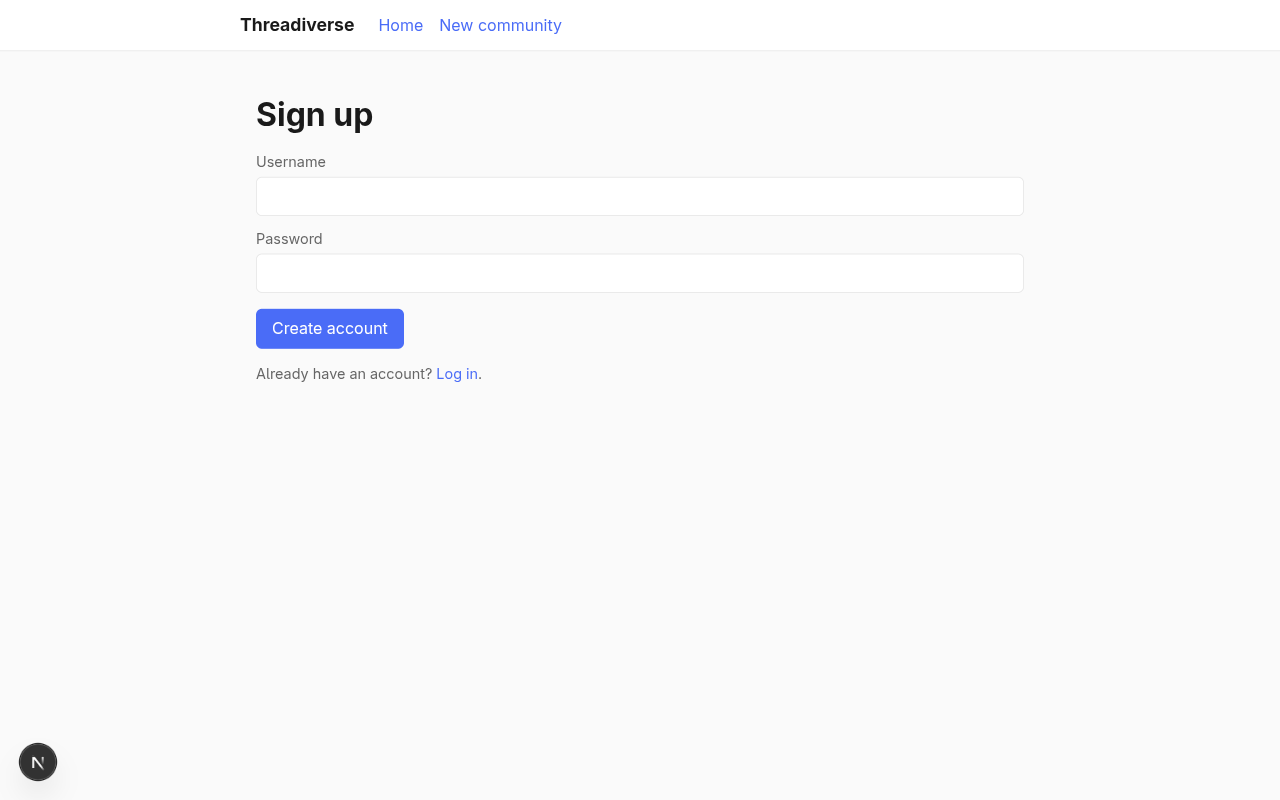
Fill in a username and password and click Create account. The browser will redirect to /login?message=..., which currently 404s because we haven't built the login page yet. That's fine; the signup half of the flow worked, and the row is in the database. We'll verify that, and build the login half, in the next section.
Login and sessions
A user who signed up last section ended up at a /login URL that doesn't exist yet. Let's build login and cookie-based sessions so the account is usable.
There are lots of ways to do session management in a web app. We'll use the simplest one that's safe for our purposes: a server-side sessions table keyed by an opaque random token, and an HTTP-only cookie that stores just that token. The browser never sees the user ID or any other data; when a request comes in, we look the token up in the database to find the user it belongs to. This keeps the cookie cheap to invalidate (delete the row, the cookie becomes useless) and means we don't need to pick or rotate a cookie signing secret.
Add the table to db/schema.ts:
import { sql } from "drizzle-orm";
import { integer, sqliteTable, text } from "drizzle-orm/sqlite-core";
export const users = sqliteTable("users", {
id: integer("id").primaryKey({ autoIncrement: true }),
username: text("username").notNull().unique(),
passwordHash: text("password_hash").notNull(),
createdAt: integer("created_at", { mode: "timestamp" })
.notNull()
.default(sql`(unixepoch())`),
});
export type User = typeof users.$inferSelect;
export type NewUser = typeof users.$inferInsert;
export const sessions = sqliteTable("sessions", {
token: text("token").primaryKey(),
userId: integer("user_id")
.notNull()
.references(() => users.id, { onDelete: "cascade" }),
expiresAt: integer("expires_at", { mode: "timestamp" }).notNull(),
createdAt: integer("created_at", { mode: "timestamp" })
.notNull()
.default(sql`(unixepoch())`),
});
onDelete: "cascade" on the userId reference means that deleting a user automatically deletes their sessions too, so there are no dangling rows.
Re-run the schema sync:
npm run db:pushInstall the server-only package so that importing server-side code from a client component fails at build time instead of leaking secrets:
npm install -D server-onlyNow write the session helpers. Create lib/session.ts:
import "server-only";

import { randomBytes } from "node:crypto";
import { and, eq, gt } from "drizzle-orm";
import { cookies } from "next/headers";
import { db, sessions, type User, users } from "@/db";

const COOKIE_NAME = "session";
const MAX_AGE_SECONDS = 60 * 60 * 24 * 30;

export async function createSession(userId: number): Promise<void> {
  const token = randomBytes(32).toString("base64url");
  const expiresAt = new Date(Date.now() + MAX_AGE_SECONDS * 1000);
  db.insert(sessions).values({ token, userId, expiresAt }).run();
  const store = await cookies();
  store.set(COOKIE_NAME, token, {
    httpOnly: true,
    sameSite: "lax",
    secure: process.env.NODE_ENV === "production",
    path: "/",
    maxAge: MAX_AGE_SECONDS,
  });
}

export async function getCurrentUser(): Promise<User | null> {
  const store = await cookies();
  const token = store.get(COOKIE_NAME)?.value;
  if (!token) return null;
  const row = db
    .select()
    .from(sessions)
    .innerJoin(users, eq(sessions.userId, users.id))
    .where(and(eq(sessions.token, token), gt(sessions.expiresAt, new Date())))
    .get();
  return row?.users ?? null;
}

export async function destroySession(): Promise<void> {
  const store = await cookies();
  const token = store.get(COOKIE_NAME)?.value;
  if (token) {
    db.delete(sessions).where(eq(sessions.token, token)).run();
  }
  store.delete(COOKIE_NAME);
}
A few notes:
randomBytes(32).toString("base64url")produces a 43-character URL-safe random string. That's our session token.httpOnly: truehides the cookie from JavaScript running in the page and rules out a whole class of cross-site scripting attacks.sameSite: "lax"means the cookie is included on top-level cross-site navigations but not on cross-site embeds, which keeps CSRF exposure small for our purposes.secure: process.env.NODE_ENV === "production"sets theSecureflag in production (the browser will only send the cookie over HTTPS) but leaves it off in development so you can log in overhttp://localhost.- The join in
getCurrentUserdoessessions ⨝ users ON user_id, and thewherefilters out expired rows so we don't treat them as valid.
Now the login page. Create app/login/page.tsx:
import Link from "next/link";
import { login } from "./actions";

type LoginPageProps = {
  searchParams: Promise<{ error?: string; message?: string }>;
};

export default async function LoginPage({ searchParams }: LoginPageProps) {
  const { error, message } = await searchParams;
  return (
    <>
      <h1>Log in</h1>
      {message && <p className="muted">{message}</p>}
      {error && <p className="muted">{error}</p>}
      <form action={login}>
        <label>
          Username
          <input type="text" name="username" required />
        </label>
        <label>
          Password
          <input type="password" name="password" required />
        </label>
        <button type="submit">Log in</button>
      </form>
      <p className="muted">
        Need an account? <Link href="/signup">Sign up</Link>.
      </p>
    </>
  );
}
And the login and logout server actions in app/login/actions.ts:
"use server";

import { eq } from "drizzle-orm";
import { redirect } from "next/navigation";
import { db, users } from "@/db";
import { verifyPassword } from "@/lib/auth";
import { createSession, destroySession } from "@/lib/session";

export async function login(formData: FormData): Promise<void> {
  const username = String(formData.get("username") ?? "").trim();
  const password = String(formData.get("password") ?? "");

  const user = db
    .select()
    .from(users)
    .where(eq(users.username, username))
    .get();
  if (!user || !(await verifyPassword(password, user.passwordHash))) {
    redirect("/login?error=Invalid+username+or+password");
  }

  await createSession(user.id);
  redirect("/");
}

export async function logout(): Promise<void> {
  await destroySession();
  redirect("/");
}
Finally, change the root layout into an async server component so that every page knows whether a user is signed in. Replace app/layout.tsx with:
import type { Metadata } from "next";
import Link from "next/link";
import { logout } from "./login/actions";
import "./globals.css";
import { getCurrentUser } from "@/lib/session";

export const metadata: Metadata = {
  title: "Threadiverse",
  description: "A small federated community platform built with Fedify.",
};

export default async function RootLayout({
  children,
}: Readonly<{
  children: React.ReactNode;
}>) {
  const user = await getCurrentUser();
  return (
    <html lang="en">
      <body>
        <nav className="site-nav">
          <div className="inner">
            <Link href="/" className="brand">
              Threadiverse
            </Link>
            <ul>
              <li>
                <Link href="/">Home</Link>
              </li>
              <li>
                <Link href="/communities/new">New community</Link>
              </li>
            </ul>
            {user ? (
              <form action={logout} className="session-controls">
                <span className="muted">@{user.username}</span>
                <button type="submit" className="link-button">
                  Log out
                </button>
              </form>
            ) : (
              <div className="session-controls">
                <Link href="/login">Log in</Link>
                <Link href="/signup">Sign up</Link>
              </div>
            )}
          </div>
        </nav>
        <main>{children}</main>
      </body>
    </html>
  );
}
Append a few more lines to app/globals.css for the new nav elements:
nav.site-nav .session-controls {
  display: flex;
  align-items: center;
  gap: 0.75rem;
  margin: 0;
}

nav.site-nav .link-button {
  margin: 0;
  padding: 0;
  background: transparent;
  color: var(--color-accent);
  border: 0;
  cursor: pointer;
  font: inherit;
}

nav.site-nav .link-button:hover {
  background: transparent;
  color: var(--color-accent-hover);
  text-decoration: underline;
}
Reload /signup, create an account, and you'll now land on a working login page. Sign in with the same credentials and the nav bar flips over to show @yourusername and a Log out button:
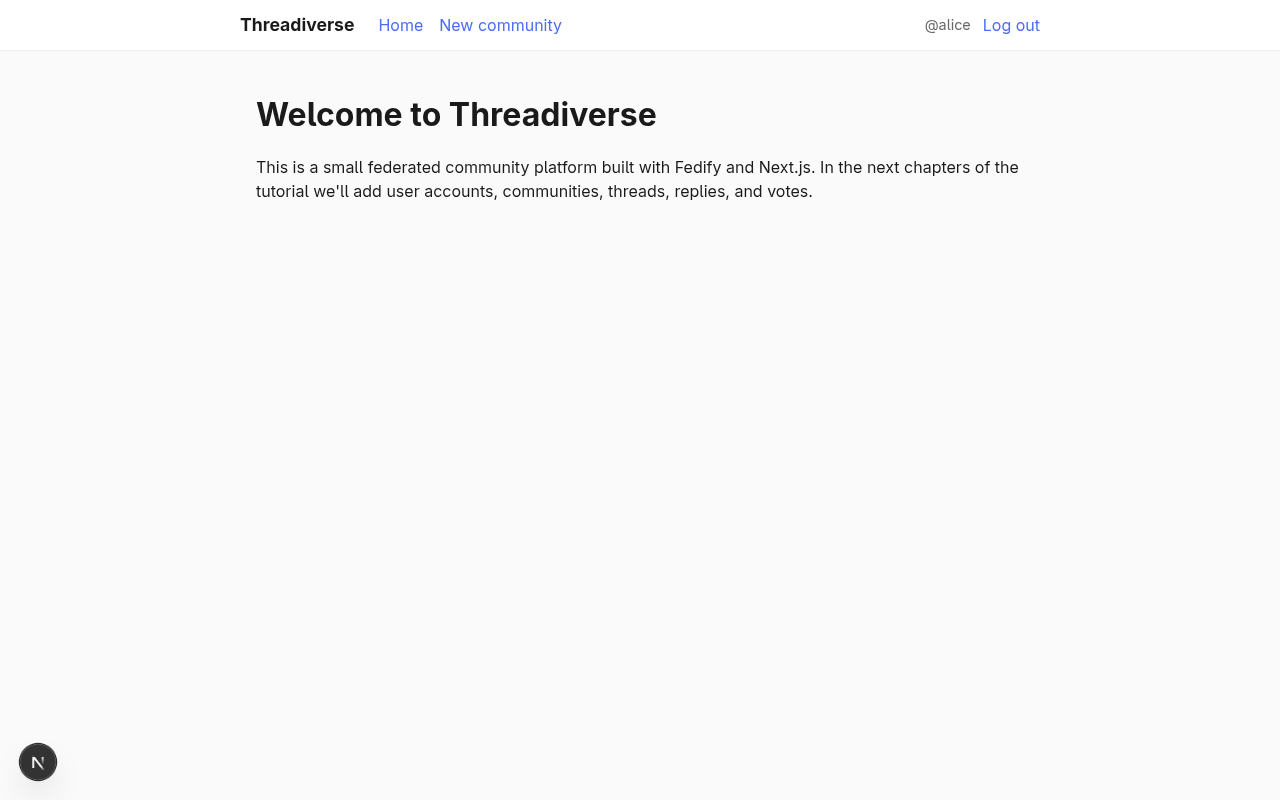
Clicking Log out submits the logout action, which deletes the session row and clears the cookie, and the nav bar flips back to Log in / Sign up.
TIP
You can inspect the cookie with your browser's developer tools (usually under Application → Cookies). You should see a session cookie whose value is the same 43-character token as the token column of the sessions table.
Profile page
Every user needs a page to call their own. For now we'll keep it simple: URL path, display name, join date. Create app/users/[username]/page.tsx:
import { eq } from "drizzle-orm";
import { notFound } from "next/navigation";
import { db, users } from "@/db";

type ProfilePageProps = {
  params: Promise<{ username: string }>;
};

export default async function ProfilePage({ params }: ProfilePageProps) {
  const { username } = await params;
  const user = db
    .select({
      id: users.id,
      username: users.username,
      createdAt: users.createdAt,
    })
    .from(users)
    .where(eq(users.username, username))
    .get();
  if (!user) notFound();
  return (
    <>
      <h1>@{user.username}</h1>
      <p className="muted">
        Joined{" "}
        {user.createdAt.toLocaleDateString("en-US", {
          year: "numeric",
          month: "long",
          day: "numeric",
        })}
      </p>
      <p>Threads and replies by this user will appear here.</p>
    </>
  );
}
A few things to notice:
- The square brackets in the folder name
[username]makeusernamea dynamic segment. The Next.js router will match any path of the form/users/<something>and pass thatsomethingasparams.username. paramsis a Promise in recent versions of Next.js, so weawaitit before destructuring.notFound()aborts rendering and shows the nearestnot-found.tsx(or, if there isn't one, the default404 Not Foundpage).
While we're here, turn the @username label in the nav bar into a link that points to the current user's profile. In app/layout.tsx, replace the <span> with a <Link>:
<form action={logout} className="session-controls">
  <Link href={`/users/${user.username}`}>@{user.username}</Link>
  <button type="submit" className="link-button">
    Log out
  </button>
</form>
Reload and visit /users/alice (or whatever username you signed up with). You should see something like this:
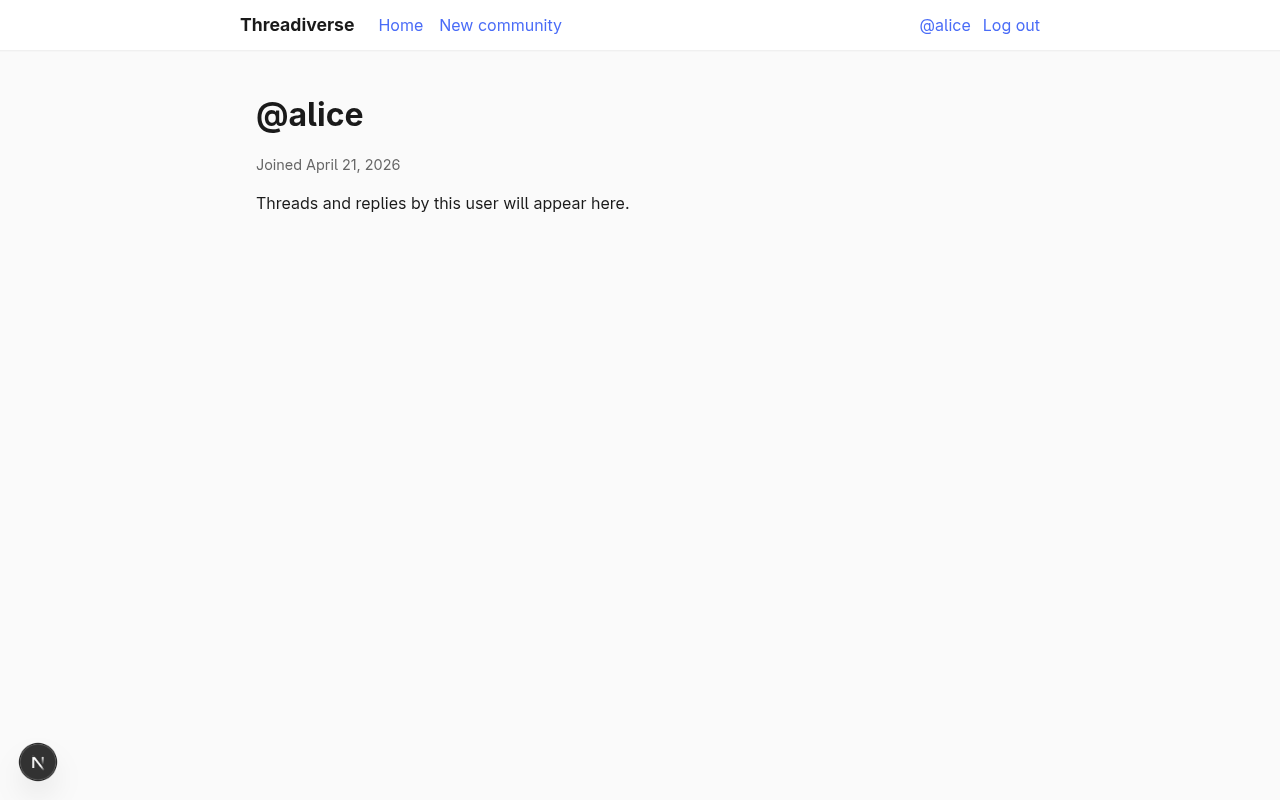
The same URL right now, when you open it with a browser, renders the HTML page above. But if a fediverse server asks for it with an Accept: application/activity+json header, Fedify's middleware intercepts the request and returns the default placeholder Person actor we saw earlier. In Federating your user: the Person actor we'll swap that placeholder for a proper actor backed by our users table, so searching @alice@<your-host> in Mastodon or Lemmy actually finds the account we just created.
Federating your user: the Person actor
All the pieces we've built so far have been local. In this chapter we turn a local user into a federated Person actor: a server-side entity that other fediverse software can look up by handle, send follow requests to, and verify signatures from. This is the first chapter where ActivityPub itself shows up.
The keys table
Every federated actor needs a pair of cryptographic keys. HTTP Signatures, the scheme that authenticates server-to-server requests, uses an RSA key. Object Integrity Proofs (sometimes called Linked Data Signatures or FEP-8b32) use an Ed25519 key. We'll generate one of each per actor and store both.
Open db/schema.ts and add a keys table:
import { sql } from "drizzle-orm";
import {
integer,
sqliteTable,
text,
uniqueIndex,
} from "drizzle-orm/sqlite-core";
export const users = sqliteTable("users", {
id: integer("id").primaryKey({ autoIncrement: true }),
username: text("username").notNull().unique(),
passwordHash: text("password_hash").notNull(),
createdAt: integer("created_at", { mode: "timestamp" })
.notNull()
.default(sql`(unixepoch())`),
});
export type User = typeof users.$inferSelect;
export type NewUser = typeof users.$inferInsert;
export const sessions = sqliteTable("sessions", {
token: text("token").primaryKey(),
userId: integer("user_id")
.notNull()
.references(() => users.id, { onDelete: "cascade" }),
expiresAt: integer("expires_at", { mode: "timestamp" }).notNull(),
createdAt: integer("created_at", { mode: "timestamp" })
.notNull()
.default(sql`(unixepoch())`),
});
export type Session = typeof sessions.$inferSelect;
export const keys = sqliteTable(
"keys",
{
id: integer("id").primaryKey({ autoIncrement: true }),
actorIdentifier: text("actor_identifier").notNull(),
type: text("type", { enum: ["RSASSA-PKCS1-v1_5", "Ed25519"] }).notNull(),
privateKey: text("private_key").notNull(),
publicKey: text("public_key").notNull(),
createdAt: integer("created_at", { mode: "timestamp" })
.notNull()
.default(sql`(unixepoch())`),
},
(table) => [
uniqueIndex("keys_actor_type_idx").on(table.actorIdentifier, table.type),
],
);
A couple of things about this schema worth calling out:
actorIdentifieris a plain string rather than a foreign key to a specific table. That's deliberate: in Communities asGroupactors we'll add a second kind of actor (communities, i.e.Groupactors). Keeping keys keyed by identifier lets the same table serve both user and community keys without a schema change.- The
typecolumn uses Drizzle ORM'senumoption, which in Drizzle ORM plus SQLite produces aCHECKconstraint that rejects rows whosetypeisn't one of the two values we listed. - The composite unique index
(actor_identifier, type)makes sure each actor has at most one key of each algorithm.
Apply the schema change:
npm run db:pushActor dispatcher and key pairs dispatcher
Now rewrite federation/index.ts to replace the placeholder Person that fedify init left behind with a real one backed by the database:
import {
  createFederation,
  exportJwk,
  generateCryptoKeyPair,
  importJwk,
  InProcessMessageQueue,
  MemoryKvStore,
} from "@fedify/fedify";
import { Endpoints, Person } from "@fedify/vocab";
import { and, eq } from "drizzle-orm";
import { db, keys, users } from "@/db";

const federation = createFederation({
  kv: new MemoryKvStore(),
  queue: new InProcessMessageQueue(),
});

federation
  .setActorDispatcher("/users/{identifier}", async (ctx, identifier) => {
    const user = db
      .select()
      .from(users)
      .where(eq(users.username, identifier))
      .get();
    if (!user) return null;

    const keyPairs = await ctx.getActorKeyPairs(identifier);
    return new Person({
      id: ctx.getActorUri(identifier),
      preferredUsername: identifier,
      name: identifier,
      inbox: ctx.getInboxUri(identifier),
      endpoints: new Endpoints({ sharedInbox: ctx.getInboxUri() }),
      url: new URL(`/users/${identifier}`, ctx.url),
      publicKey: keyPairs[0]?.cryptographicKey,
      assertionMethods: keyPairs.map((k) => k.multikey),
    });
  })
  .setKeyPairsDispatcher(async (_ctx, identifier) => {
    const user = db
      .select({ id: users.id })
      .from(users)
      .where(eq(users.username, identifier))
      .get();
    if (!user) return [];

    const pairs: CryptoKeyPair[] = [];
    for (const keyType of ["RSASSA-PKCS1-v1_5", "Ed25519"] as const) {
      const existing = db
        .select()
        .from(keys)
        .where(
          and(eq(keys.actorIdentifier, identifier), eq(keys.type, keyType)),
        )
        .get();
      if (existing) {
        pairs.push({
          privateKey: await importJwk(
            JSON.parse(existing.privateKey),
            "private",
          ),
          publicKey: await importJwk(JSON.parse(existing.publicKey), "public"),
        });
      } else {
        const pair = await generateCryptoKeyPair(keyType);
        db.insert(keys)
          .values({
            actorIdentifier: identifier,
            type: keyType,
            privateKey: JSON.stringify(await exportJwk(pair.privateKey)),
            publicKey: JSON.stringify(await exportJwk(pair.publicKey)),
          })
          .run();
        pairs.push(pair);
      }
    }
    return pairs;
  });

federation.setInboxListeners("/users/{identifier}/inbox", "/inbox");

export default federation;
A walk-through of what changed:
setActorDispatcheris the hook Fedify calls whenever an ActivityPub client wants a specific actor. Thepathargument is the URL template the actor lives at (/users/{identifier}), and the callback returns an actor object ornullfor “no such actor”. Returningnullmakes Fedify respond with404 Not Found.ctx.getActorKeyPairs(identifier)is how the dispatcher gets the actor's keys in the right format. It calls oursetKeyPairsDispatcherinternally, wraps each pair with metadata that Fedify needs, and caches the result. The returnedkeyPairs[0]is always the RSA pair, which is whatpublicKeywants;keyPairs.map((k) => k.multikey)produces theMultikeyarray that goes intoassertionMethodsfor FEP-8b32 verification.new Endpoints({ sharedInbox: ctx.getInboxUri() })advertises a single shared inbox URL the actor is reachable through. Large fediverse servers use the shared inbox to deliver one copy of an activity to many followers on the same host.setKeyPairsDispatcheris the hook that reads (or lazily creates) the two key pairs for an actor. The first time you look up an actor, both keys are missing and we generate them; every subsequent lookup returns the stored pair.setInboxListenersregisters the URL template Fedify should use for the per-actor inbox and the path for the shared inbox. We haven't attached anyon(Activity, ...)handlers yet, so the inbox accepts no activities for now; we'll add those in later chapters. But registering the paths is what letsctx.getInboxUri()resolve in the actor dispatcher above.
TIP
Fedify's inbox and actor URLs are derived from the templates you pass to setActorDispatcher and setInboxListeners. If you later want to change the URL scheme (for example from /users/{identifier} to /u/{identifier}), you only have to change the template; everything that calls ctx.getActorUri(identifier) or ctx.getInboxUri(identifier) follows along.
Verifying locally
Start (or restart) the dev server with npm run dev and sign up if you haven't already. Then in a second terminal, ask Fedify to look up the actor:
fedify lookup http://localhost:3000/users/aliceYou should see output that starts like this:
Person {
  id: URL 'http://localhost:3000/users/alice',
  preferredUsername: 'alice',
  name: 'alice',
  inbox: URL 'http://localhost:3000/users/alice/inbox',
  ...
  publicKey: CryptographicKey { ... },
  assertionMethods: [ Multikey { ... }, Multikey { ... } ],
}
Check the WebFinger endpoint directly too:
curl -H 'Accept: application/jrd+json' \
  "http://localhost:3000/.well-known/webfinger?resource=acct:alice@localhost:3000"
The response is a JRD document pointing rel="self" at the actor URL:
{
  "subject": "acct:alice@localhost:3000",
  "aliases": ["http://localhost:3000/users/alice"],
  "links": [
    { "rel": "self", "href": "http://localhost:3000/users/alice",
      "type": "application/activity+json" },
    { "rel": "http://webfinger.net/rel/profile-page",
      "href": "http://localhost:3000/users/alice" }
  ]
}
Peek at the database too: every time the dispatcher runs for a user with no stored keys, two rows appear in the keys table, one with type = "RSASSA-PKCS1-v1_5" and one with type = "Ed25519".
Letting the wider fediverse see your actor
Right now the actor is reachable only at http://localhost:3000, and no remote server can verify a connection to localhost. To let an outside server discover this actor we need two things: a reverse proxy, and a bit of code that tells Fedify to trust the Host and Proto that the proxy forwards in.
Running the tunnel
Fedify ships a convenience command, fedify tunnel, that wraps Serveo to give you a free public HTTPS URL pointing at a local port. In a new terminal, run:
fedify tunnel 3000After a few seconds the command prints a line like:
✔ Your local server is now publicly accessible:

  https://<random-subdomain>.serveo.net

Press ^C to stop the server.
Leave that terminal running as long as you want the public URL to exist.
WARNING
Tunnel services come and go, and occasionally a given provider is unavailable or drops your session silently after a few minutes of idle traffic. If fedify tunnel hangs on Creating a secure tunnel or your tunnel URL stops responding, the easiest workaround is to restart the command (or fall back to cloudflared or ngrok). The URL usually changes on restart, so expect to re-paste it anywhere you typed it in.
Honouring X-forwarded-* headers
When a request comes in through a tunnel, Next.js sees the tunnel as a reverse proxy. The real public host is in the X-Forwarded-Host and X-Forwarded-Proto headers; the Host header itself says localhost:3000. Without any changes Fedify builds its actor URLs from Host, so remote servers see https://localhost:3000/users/alice and can't fetch it.
Fix this by wrapping the request with x-forwarded-fetch inside the middleware. Install the package first:
npm install x-forwarded-fetchThen rewrite middleware.ts:
import { integrateFederation, isFederationRequest } from "@fedify/next";
import { NextResponse } from "next/server";
import { getXForwardedRequest } from "x-forwarded-fetch";
import federation from "./federation";

const federationHandler = integrateFederation(federation);

export default async function middleware(request: Request) {
  const forwarded = await getXForwardedRequest(request);
  if (isFederationRequest(forwarded)) {
    return await federationHandler(forwarded);
  }
  return NextResponse.next();
}

export const config = {
  runtime: "nodejs",
  matcher: [
    {
      source: "/:path*",
      has: [
        {
          type: "header",
          key: "Accept",
          value: ".*application\\/((jrd|activity|ld)\\+json|xrd\\+xml).*",
        },
      ],
    },
    {
      source: "/:path*",
      has: [
        {
          type: "header",
          key: "content-type",
          value: ".*application\\/((jrd|activity|ld)\\+json|xrd\\+xml).*",
        },
      ],
    },
    { source: "/.well-known/nodeinfo" },
    { source: "/.well-known/x-nodeinfo2" },
  ],
};
getXForwardedRequest() returns a new Request whose url, protocol, and host reflect X-Forwarded-* headers when they're present. We then pass that rewritten request through to either Fedify (if it's an ActivityPub or NodeInfo request) or the normal Next.js pipeline.
WARNING
Only call getXForwardedRequest() when you know that every HTTP request reaches your app through a trusted proxy. If your server also serves requests directly from the public internet, a malicious client can set its own X-Forwarded-Host and impersonate any domain.
Searching from the academy
With the tunnel running and the middleware fixed, fetch your actor through the public URL to confirm the IDs now match the tunnel host:
curl -H 'Accept: application/activity+json' \
  https://<your-tunnel>.serveo.net/users/alice
The JSON's id, inbox, and endpoints.sharedInbox should all say https://<your-tunnel>.serveo.net/..., not http://localhost:3000/....
Next, open ActivityPub.Academy—a throwaway Mastodon instance the fediverse community runs for exactly this kind of testing—in a browser. Sign up for a temporary account, then paste @alice@<your-tunnel>.serveo.net into the search box:
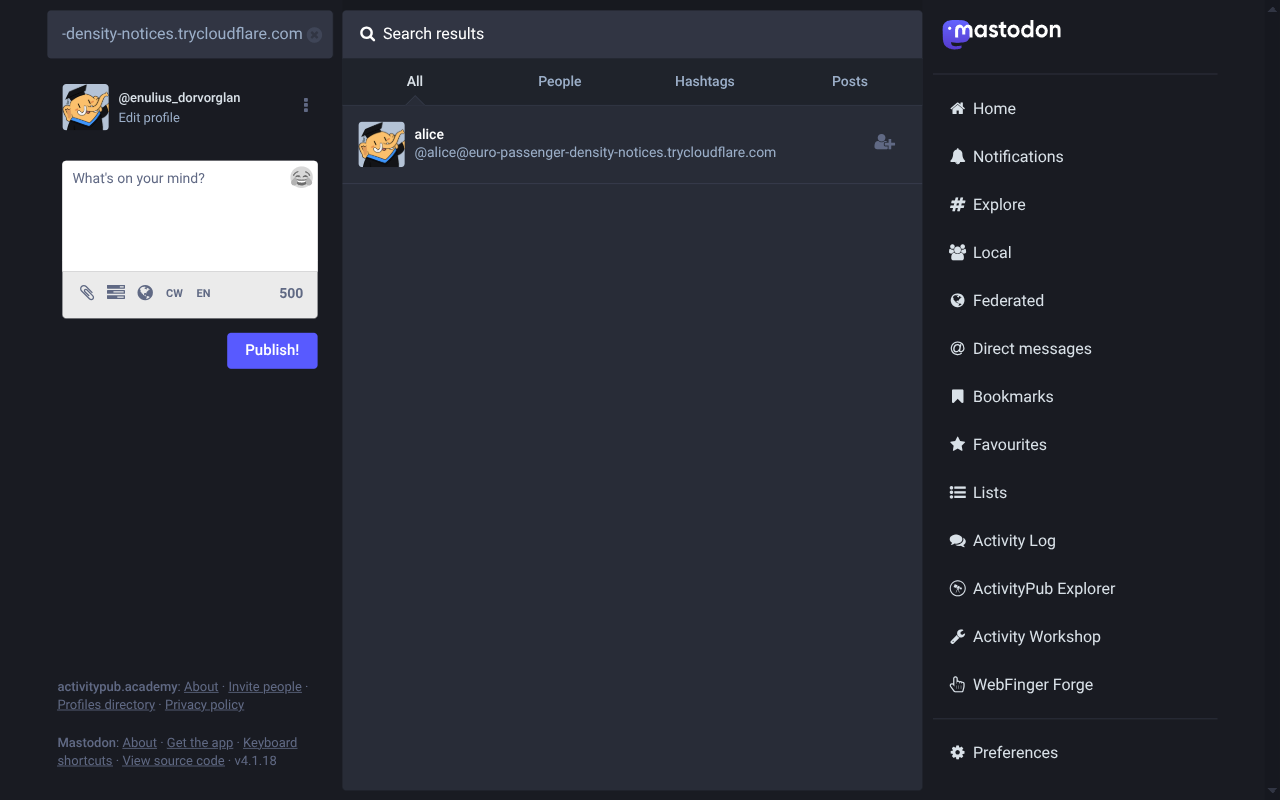
Academy looks your account up via WebFinger, fetches the actor JSON, and shows it as a result. That's all we need for now: the wider fediverse can now see the user we created. In Communities as Group actors and Subscribing to communities we'll pair this with a Follow handler so the academy (and other servers) can actually subscribe.
Communities as Group actors
In the threadiverse, the unit of organisation is the community: a topic bucket that local and remote users can subscribe to, post threads into, and reply inside. Every community is itself an actor, just like a user, but represented as a Group in ActivityPub. This chapter adds communities to the local database, gives them a UI, and teaches Fedify to serve them as Group actors alongside the Person actors we already have.
The communities table
Add a new table to db/schema.ts:
export const communities = sqliteTable("communities", {
  id: integer("id").primaryKey({ autoIncrement: true }),
  slug: text("slug").notNull().unique(),
  name: text("name").notNull(),
  description: text("description").notNull().default(""),
  creatorId: integer("creator_id")
    .notNull()
    .references(() => users.id),
  createdAt: integer("created_at", { mode: "timestamp" })
    .notNull()
    .default(sql`(unixepoch())`),
});

export type Community = typeof communities.$inferSelect;
export type NewCommunity = typeof communities.$inferInsert;
slug is the machine-readable identifier, the part that appears in URLs and in the federated handle !slug@host. name is the human-readable title, displayed to users. creator_id is a foreign key to the local user who opened the community.
Apply it:
npm run db:pushShared identifier namespace
Fedify's setActorDispatcher registers exactly one URL template per Federation instance. The scaffold uses /users/{identifier} for Person actors, and we'll reuse the same template for Group actors too, because Fedify routes every actor through the same dispatcher.
That means a username like alice and a community slug like alice can't both exist: when someone fetches /users/alice, the dispatcher has to pick one interpretation. Put the uniqueness check in a helper so signup and community creation can share it. Create lib/identifiers.ts:
import "server-only";

import { eq } from "drizzle-orm";
import { communities, db, users } from "@/db";

export const IDENTIFIER_PATTERN = /^[a-zA-Z0-9_]{2,32}$/;

export function isValidIdentifier(identifier: string): boolean {
  return IDENTIFIER_PATTERN.test(identifier);
}

export function isIdentifierTaken(identifier: string): boolean {
  const user = db
    .select({ id: users.id })
    .from(users)
    .where(eq(users.username, identifier))
    .get();
  if (user) return true;
  const community = db
    .select({ id: communities.id })
    .from(communities)
    .where(eq(communities.slug, identifier))
    .get();
  return community != null;
}
Then rewrite the signup action to consult it (replace the hand-rolled regex and the direct user lookup):
"use server";

import { redirect } from "next/navigation";
import { db, users } from "@/db";
import { hashPassword } from "@/lib/auth";
import { isIdentifierTaken, isValidIdentifier } from "@/lib/identifiers";

export async function signup(formData: FormData): Promise<void> {
  const username = String(formData.get("username") ?? "").trim();
  const password = String(formData.get("password") ?? "");

  if (!isValidIdentifier(username)) {
    redirect("/signup?error=Invalid+username");
  }
  if (password.length < 8) {
    redirect("/signup?error=Password+must+be+at+least+8+characters");
  }
  if (isIdentifierTaken(username)) {
    redirect("/signup?error=Username+already+taken");
  }

  const passwordHash = await hashPassword(password);
  db.insert(users).values({ username, passwordHash }).run();

  redirect("/login?message=Account+created,+please+log+in");
}
Community creation form
Create app/communities/new/page.tsx. It's an async server component that redirects anonymous visitors to /login and otherwise renders a slug + name + description form:
import { redirect } from "next/navigation";
import { getCurrentUser } from "@/lib/session";
import { createCommunity } from "./actions";

type NewCommunityPageProps = {
  searchParams: Promise<{ error?: string }>;
};

export default async function NewCommunityPage({
  searchParams,
}: NewCommunityPageProps) {
  const user = await getCurrentUser();
  if (!user) redirect("/login?message=Log+in+to+create+a+community");
  const { error } = await searchParams;
  return (
    <>
      <h1>Create a community</h1>
      <p className="muted">
        You are opening this community as <strong>@{user.username}</strong>.
      </p>
      {error && <p className="muted">{error}</p>}
      <form action={createCommunity}>
        <label>
          Slug
          <input
            type="text"
            name="slug"
            required
            pattern="[a-zA-Z0-9_]{2,32}"
            title="2–32 letters, digits, or underscores"
          />
        </label>
        <label>
          Name
          <input type="text" name="name" required maxLength={64} />
        </label>
        <label>
          Description
          <textarea name="description" maxLength={500} />
        </label>
        <button type="submit">Create community</button>
      </form>
      <p className="muted">
        The slug becomes the community's federated handle, e.g.{" "}
        <code>!slug@your-host</code>.
      </p>
    </>
  );
}
And the server action in app/communities/new/actions.ts:
"use server";

import { redirect } from "next/navigation";
import { communities, db } from "@/db";
import { isIdentifierTaken, isValidIdentifier } from "@/lib/identifiers";
import { getCurrentUser } from "@/lib/session";

export async function createCommunity(formData: FormData): Promise<void> {
  const user = await getCurrentUser();
  if (!user) redirect("/login?message=Log+in+to+create+a+community");

  const slug = String(formData.get("slug") ?? "").trim();
  const name = String(formData.get("name") ?? "").trim();
  const description = String(formData.get("description") ?? "").trim();

  if (!isValidIdentifier(slug)) {
    redirect("/communities/new?error=Invalid+slug");
  }
  if (!name) {
    redirect("/communities/new?error=Name+is+required");
  }
  if (isIdentifierTaken(slug)) {
    redirect(
      `/communities/new?error=${encodeURIComponent(
        "Slug is already taken by a user or another community",
      )}`,
    );
  }

  db.insert(communities)
    .values({ slug, name, description, creatorId: user.id })
    .run();

  redirect(`/users/${slug}`);
}
The action re-checks the session (never trust that a client-side redirect ran), validates the slug and name, ensures the slug doesn't collide with a username or another community, inserts the row, and redirects to the community's URL.
Log in, open http://localhost:3000/communities/new, and fill the form:
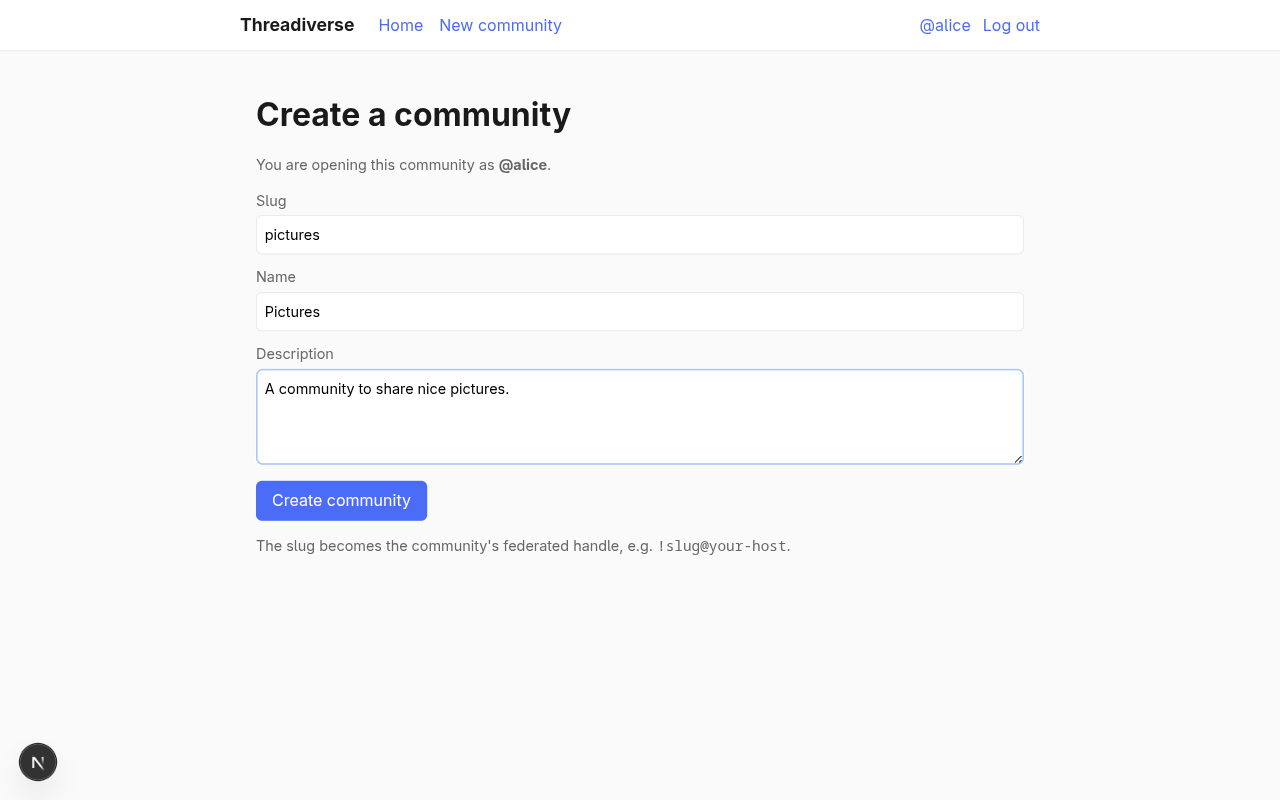
Submitting redirects to /users/<slug>, which 404s for now; the profile page only knows about users. The next section fixes that.
Rendering the community page
Teach the profile page to fall through to communities when the identifier doesn't match a user. Rewrite app/users/[username]/page.tsx:
import { eq } from "drizzle-orm";
import { notFound } from "next/navigation";
import { communities, db, users } from "@/db";

type ProfilePageProps = {
  params: Promise<{ username: string }>;
};

export default async function ProfilePage({ params }: ProfilePageProps) {
  const { username: identifier } = await params;

  const user = db
    .select({
      id: users.id,
      username: users.username,
      createdAt: users.createdAt,
    })
    .from(users)
    .where(eq(users.username, identifier))
    .get();
  if (user) {
    return (
      <>
        <h1>@{user.username}</h1>
        <p className="muted">
          Joined{" "}
          {user.createdAt.toLocaleDateString("en-US", {
            year: "numeric",
            month: "long",
            day: "numeric",
          })}
        </p>
        <p>Threads and replies by this user will appear here.</p>
      </>
    );
  }

  const community = db
    .select()
    .from(communities)
    .where(eq(communities.slug, identifier))
    .get();
  if (community) {
    return (
      <>
        <h1>!{community.slug}</h1>
        <h2 style={{ fontWeight: "normal", marginTop: 0 }}>{community.name}</h2>
        {community.description && <p>{community.description}</p>}
        <p className="muted">
          Created{" "}
          {community.createdAt.toLocaleDateString("en-US", {
            year: "numeric",
            month: "long",
            day: "numeric",
          })}
        </p>
        <p>Threads posted in this community will appear here.</p>
      </>
    );
  }

  notFound();
}
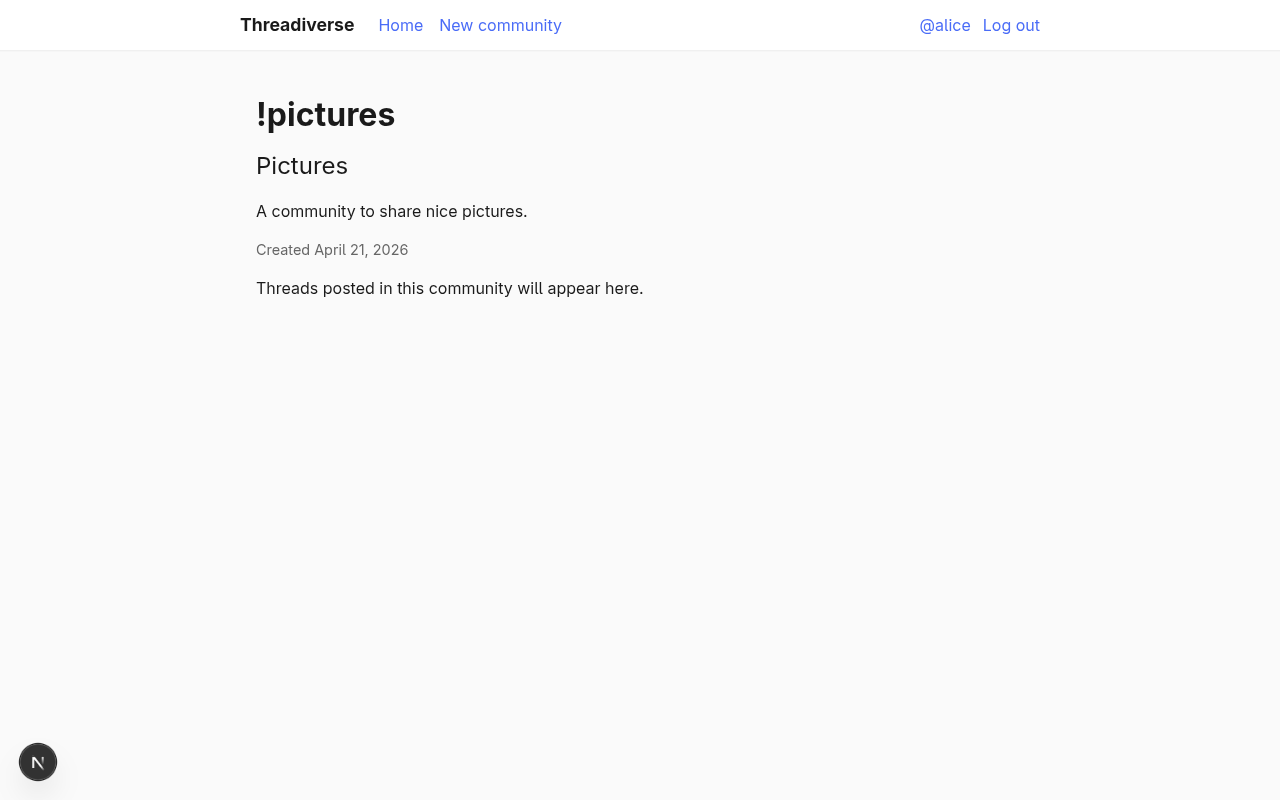
Reload /users/<slug> after creating a community and the page now renders the community's slug, name, description, and a placeholder for future threads:
The Group actor dispatcher
Now the federation side. Teach the actor dispatcher to return a Group when the identifier belongs to a community, and extend the key pairs dispatcher so community slugs also get lazily generated keys. Replace the body of federation/index.ts with:
import {
  createFederation,
  exportJwk,
  generateCryptoKeyPair,
  importJwk,
  InProcessMessageQueue,
  MemoryKvStore,
} from "@fedify/fedify";
import { Endpoints, Group, Person } from "@fedify/vocab";
import { and, eq } from "drizzle-orm";
import { communities, db, keys, users } from "@/db";

const federation = createFederation({
  kv: new MemoryKvStore(),
  queue: new InProcessMessageQueue(),
});

federation
  .setActorDispatcher("/users/{identifier}", async (ctx, identifier) => {
    const user = db
      .select()
      .from(users)
      .where(eq(users.username, identifier))
      .get();
    if (user) {
      const keyPairs = await ctx.getActorKeyPairs(identifier);
      return new Person({
        id: ctx.getActorUri(identifier),
        preferredUsername: identifier,
        name: identifier,
        inbox: ctx.getInboxUri(identifier),
        endpoints: new Endpoints({ sharedInbox: ctx.getInboxUri() }),
        url: new URL(`/users/${identifier}`, ctx.url),
        publicKey: keyPairs[0]?.cryptographicKey,
        assertionMethods: keyPairs.map((k) => k.multikey),
      });
    }

    const community = db
      .select()
      .from(communities)
      .where(eq(communities.slug, identifier))
      .get();
    if (community) {
      const keyPairs = await ctx.getActorKeyPairs(identifier);
      return new Group({
        id: ctx.getActorUri(identifier),
        preferredUsername: identifier,
        name: community.name,
        summary: community.description || undefined,
        inbox: ctx.getInboxUri(identifier),
        endpoints: new Endpoints({ sharedInbox: ctx.getInboxUri() }),
        url: new URL(`/users/${identifier}`, ctx.url),
        publicKey: keyPairs[0]?.cryptographicKey,
        assertionMethods: keyPairs.map((k) => k.multikey),
      });
    }

    return null;
  })
  .setKeyPairsDispatcher(async (_ctx, identifier) => {
    const user = db
      .select({ id: users.id })
      .from(users)
      .where(eq(users.username, identifier))
      .get();
    const community = user
      ? null
      : db
          .select({ id: communities.id })
          .from(communities)
          .where(eq(communities.slug, identifier))
          .get();
    if (!user && !community) return [];

    const pairs: CryptoKeyPair[] = [];
    for (const keyType of ["RSASSA-PKCS1-v1_5", "Ed25519"] as const) {
      const existing = db
        .select()
        .from(keys)
        .where(
          and(eq(keys.actorIdentifier, identifier), eq(keys.type, keyType)),
        )
        .get();
      if (existing) {
        pairs.push({
          privateKey: await importJwk(
            JSON.parse(existing.privateKey),
            "private",
          ),
          publicKey: await importJwk(JSON.parse(existing.publicKey), "public"),
        });
      } else {
        const pair = await generateCryptoKeyPair(keyType);
        db.insert(keys)
          .values({
            actorIdentifier: identifier,
            type: keyType,
            privateKey: JSON.stringify(await exportJwk(pair.privateKey)),
            publicKey: JSON.stringify(await exportJwk(pair.publicKey)),
          })
          .run();
        pairs.push(pair);
      }
    }
    return pairs;
  });

federation.setInboxListeners("/users/{identifier}/inbox", "/inbox");

export default federation;
Two dispatchers, one URL template, two actor types.
Testing the Group federation
Bring up fedify tunnel 3000 again if you stopped it, and with the tunnel URL fresh, fetch the community actor:
curl -H 'Accept: application/activity+json' \
  https://<your-tunnel>/users/pictures | jq '.type, .name, .preferredUsername'
The response says "type": "Group", "name": "Pictures", "preferredUsername": "pictures".
Paste @pictures@<your-tunnel> into ActivityPub.Academy's search box and the community shows up, just like a user did in the last chapter:
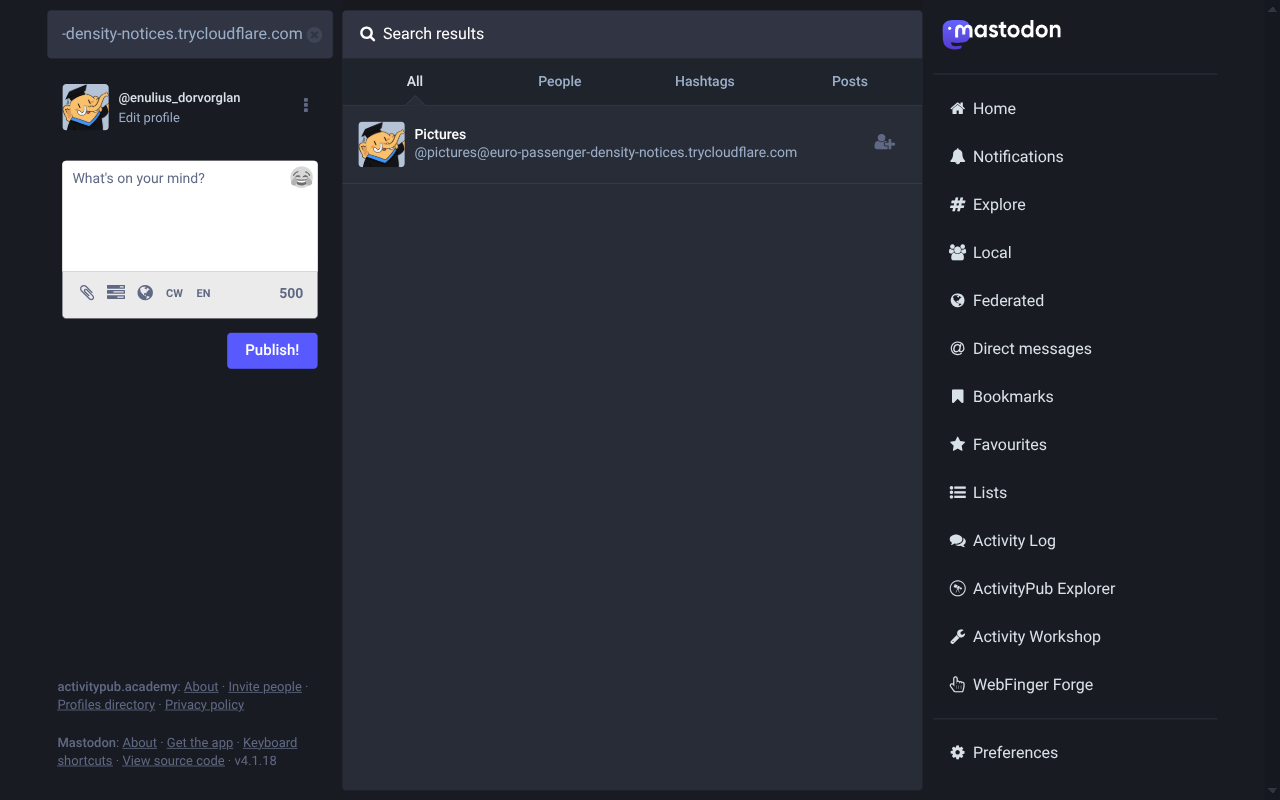
Academy, like Mastodon, calls this a group in its UI. Threadiverse software that speaks the same protocol (Lemmy, Mbin, NodeBB) will recognise it as a community they can subscribe to. In the next two sections we'll add the follow half of the story: receiving and accepting Follow requests.
Subscribing to communities
Having communities is only half of the threadiverse. The other half is letting users (local and remote) subscribe to communities, and making sure those communities see every new subscriber and acknowledge it with an Accept(Follow) activity. This chapter builds that flow in both directions.
TIP
The code blocks in this chapter use a handful of identifiers that are not yet imported in federation/index.ts: the follows table from @/db, and the Follow and Accept activity classes from @fedify/vocab. Extend the existing import blocks at the top of the file as each new name first shows up, so TypeScript stays happy.
The follows table and the followers collection
Add a follows table to db/schema.ts:
export const follows = sqliteTable(
  "follows",
  {
    id: integer("id").primaryKey({ autoIncrement: true }),
    followerUri: text("follower_uri").notNull(),
    followerInbox: text("follower_inbox").notNull(),
    followerSharedInbox: text("follower_shared_inbox"),
    followedUri: text("followed_uri").notNull(),
    accepted: integer("accepted", { mode: "boolean" }).notNull().default(false),
    createdAt: integer("created_at", { mode: "timestamp" })
      .notNull()
      .default(sql`(unixepoch())`),
  },
  (table) => [
    uniqueIndex("follows_pair_idx").on(table.followerUri, table.followedUri),
  ],
);

export type Follow = typeof follows.$inferSelect;
A row holds both sides of a subscription as plain ActivityPub URIs, plus the follower's inbox and optional shared inbox (denormalised so fan-out doesn't have to re-fetch the actor). accepted starts false and flips to true once we've seen (or sent) the corresponding Accept(Follow). The unique index on (followerUri, followedUri) keeps the table from sprouting duplicate subscriptions.
Re-run npm run db:push.
Then extend federation/index.ts to expose the followers collection. This is the endpoint a remote server paginates when it wants to know who subscribes to one of our communities. It's also what ctx.sendActivity(sender, "followers", activity) resolves to when we fan out later:
// ...
federation
  .setActorDispatcher("/users/{identifier}", async (ctx, identifier) => {
    // ...
    if (community) {
      const keyPairs = await ctx.getActorKeyPairs(identifier);
      return new Group({
        // ...existing fields...
        followers: ctx.getFollowersUri(identifier),
      });
    }
    // ...
  });

federation.setFollowersDispatcher(
  "/users/{identifier}/followers",
  async (ctx, identifier) => {
    const community = db
      .select()
      .from(communities)
      .where(eq(communities.slug, identifier))
      .get();
    if (!community) return null;
    const rows = db
      .select()
      .from(follows)
      .where(
        and(
          eq(follows.followedUri, ctx.getActorUri(identifier).href),
          eq(follows.accepted, true),
        ),
      )
      .all();
    return {
      items: rows.map((r) => ({
        id: new URL(r.followerUri),
        inboxId: new URL(r.followerInbox),
        endpoints: r.followerSharedInbox
          ? { sharedInbox: new URL(r.followerSharedInbox) }
          : null,
      })),
    };
  },
);
Adding followers: ctx.getFollowersUri(identifier) to the Group actor JSON is what makes a threadiverse server (Lemmy, Mbin) willing to call this community “real”; without it they won't trust there's a collection to paginate.
Handling an inbound Follow
Most of the Follow flow is inbox work. The community inbox needs to:
- Recognise a
Followwhoseobjectis one of our communities. - Resolve the follower's actor so we can read its
inboxandendpoints.sharedInbox. - Upsert the follows row (accepted = true for local communities, which auto-accept).
- Ship an
Accept(Follow)back to the follower.
Extend federation/index.ts:
federation
  .setInboxListeners("/users/{identifier}/inbox", "/inbox")
  .on(Follow, async (ctx, follow) => {
    if (!follow.id || !follow.actorId || !follow.objectId) return;
    const parsed = ctx.parseUri(follow.objectId);
    if (parsed?.type !== "actor") return;
    const identifier = parsed.identifier;

    const community = db
      .select()
      .from(communities)
      .where(eq(communities.slug, identifier))
      .get();
    if (!community) return;

    const actor = await follow.getActor(ctx);
    if (!actor?.id || !actor.inboxId) return;

    db.insert(follows)
      .values({
        followerUri: actor.id.href,
        followerInbox: actor.inboxId.href,
        followerSharedInbox: actor.endpoints?.sharedInbox?.href ?? null,
        followedUri: follow.objectId.href,
        accepted: true,
      })
      .onConflictDoUpdate({
        target: [follows.followerUri, follows.followedUri],
        set: {
          followerInbox: actor.inboxId.href,
          followerSharedInbox: actor.endpoints?.sharedInbox?.href ?? null,
          accepted: true,
        },
      })
      .run();

    await ctx.sendActivity(
      { identifier },
      actor,
      new Accept({
        id: new URL(
          `#accepts/${encodeURIComponent(follow.id.href)}`,
          follow.objectId,
        ),
        actor: follow.objectId,
        object: follow,
      }),
    );
  });
A few important details:
ctx.parseUri(follow.objectId)turns the URI into a{ type, identifier }tuple we can branch on. If the object isn't a local actor, or the identifier isn't a community, we bail out silently.follow.getActor(ctx)fetches the remote actor over HTTP (Fedify caches it) so we know their inbox URL.onConflictDoUpdatemakes the upsert idempotent: if the same remote user sends us a Follow twice (say, after a transient failure), we don't crash on the unique constraint.ctx.sendActivity(sender, recipient, activity)enqueues theAccepton Fedify's in-process message queue. The HTTP delivery happens asynchronously from the request that triggered it, which is important for keeping the inbox responsive.
Handling an inbound Accept(Follow)
The mirror image: when a remote community accepts one of our Follow requests, the Accept lands in the local user's inbox. Add a listener:
  .on(Accept, async (ctx, accept) => {
    const enclosed = await accept.getObject(ctx);
    if (!(enclosed instanceof Follow)) return;
    if (!enclosed.actorId || !enclosed.objectId) return;
    db.update(follows)
      .set({ accepted: true })
      .where(
        and(
          eq(follows.followerUri, enclosed.actorId.href),
          eq(follows.followedUri, enclosed.objectId.href),
        ),
      )
      .run();
  });
accept.getObject returns the object the Accept wraps. Only when that object is a Follow do we flip the corresponding row's accepted flag.
Sending an outbound Follow
Give users a UI for following remote communities. Create app/follow/page.tsx:
import { redirect } from "next/navigation";
import { getCurrentUser } from "@/lib/session";
import { followCommunity } from "./actions";

type FollowPageProps = {
  searchParams: Promise<{ error?: string; message?: string }>;
};

export default async function FollowPage({ searchParams }: FollowPageProps) {
  const user = await getCurrentUser();
  if (!user) redirect("/login?message=Log+in+to+follow+a+community");
  const { error, message } = await searchParams;
  return (
    <>
      <h1>Follow a community</h1>
      <p className="muted">
        Paste a community handle in the form <code>@slug@host</code> (for
        example <code>@fediverse@lemmy.ml</code>) or a direct URL to a
        community on any threadiverse-compatible server.
      </p>
      {message && <p className="muted">{message}</p>}
      {error && <p className="muted">{error}</p>}
      <form action={followCommunity}>
        <label>
          Handle or URL
          <input type="text" name="handle" required />
        </label>
        <button type="submit">Send follow request</button>
      </form>
    </>
  );
}
The action needs a Context so it can lookup remote actors, build URIs, and send activities. Fedify's federation.createContext(url, contextData) takes an origin URL. When the app is behind a reverse proxy, that origin must match whatever is in X-Forwarded-Host; otherwise the URIs Fedify generates would disagree with the URIs the actor dispatcher serves. Put the URL-reconstruction in a helper so every server action shares the same logic. Create lib/origin.ts:
import "server-only";

import { headers } from "next/headers";

export async function currentOrigin(): Promise<URL> {
  const h = await headers();
  const host = h.get("x-forwarded-host") ?? h.get("host") ?? "localhost:3000";
  const proto = h.get("x-forwarded-proto") ?? "http";
  return new URL(`${proto}://${host}`);
}
Now write the follow action in app/follow/actions.ts:
"use server";

import { Follow, Group, isActor } from "@fedify/vocab";
import { redirect } from "next/navigation";
import { db, follows } from "@/db";
import federation from "@/federation";
import { currentOrigin } from "@/lib/origin";
import { getCurrentUser } from "@/lib/session";

export async function followCommunity(formData: FormData): Promise<void> {
  const user = await getCurrentUser();
  if (!user) redirect("/login?message=Log+in+to+follow+a+community");

  const handle = String(formData.get("handle") ?? "").trim();
  if (!handle) {
    redirect("/follow?error=Handle+is+required");
  }

  const origin = await currentOrigin();
  const ctx = federation.createContext(origin, undefined);

  const actor = await ctx.lookupObject(handle);
  if (!isActor(actor) || !actor.id || !actor.inboxId) {
    redirect("/follow?error=Could+not+resolve+that+handle");
  }
  if (!(actor instanceof Group)) {
    redirect(
      `/follow?error=${encodeURIComponent(
        "That actor isn't a community; only Group actors can be followed here.",
      )}`,
    );
  }

  const followerUri = ctx.getActorUri(user.username);
  const followerInbox = ctx.getInboxUri(user.username);
  const sharedInbox = ctx.getInboxUri();

  db.insert(follows)
    .values({
      followerUri: followerUri.href,
      followerInbox: followerInbox.href,
      followerSharedInbox: sharedInbox.href,
      followedUri: actor.id.href,
      accepted: false,
    })
    .onConflictDoNothing()
    .run();

  await ctx.sendActivity(
    { identifier: user.username },
    actor,
    new Follow({
      id: new URL(`#follow/${Date.now()}`, followerUri),
      actor: followerUri,
      object: actor.id,
    }),
  );

  redirect(
    `/follow?message=${encodeURIComponent(
      `Follow request sent to ${handle}. It will show as accepted once the remote server confirms.`,
    )}`,
  );
}
ctx.lookupObject(handle) does a WebFinger lookup on the handle, then fetches the actor JSON the handle points at. isActor(actor) and actor instanceof Group narrow the result to the type we want to follow. We record the follow row as accepted: false up front so the UI could, if we wanted, show a “pending” badge; when the remote server sends back Accept(Follow), the inbox listener we wrote above flips it to true.
Verifying with ActivityPub.Academy
With the dev server and fedify tunnel both running, search @pictures@<your-tunnel> in ActivityPub.Academy and click the Follow button on the result card. A few seconds later, the community profile on Academy looks like this:
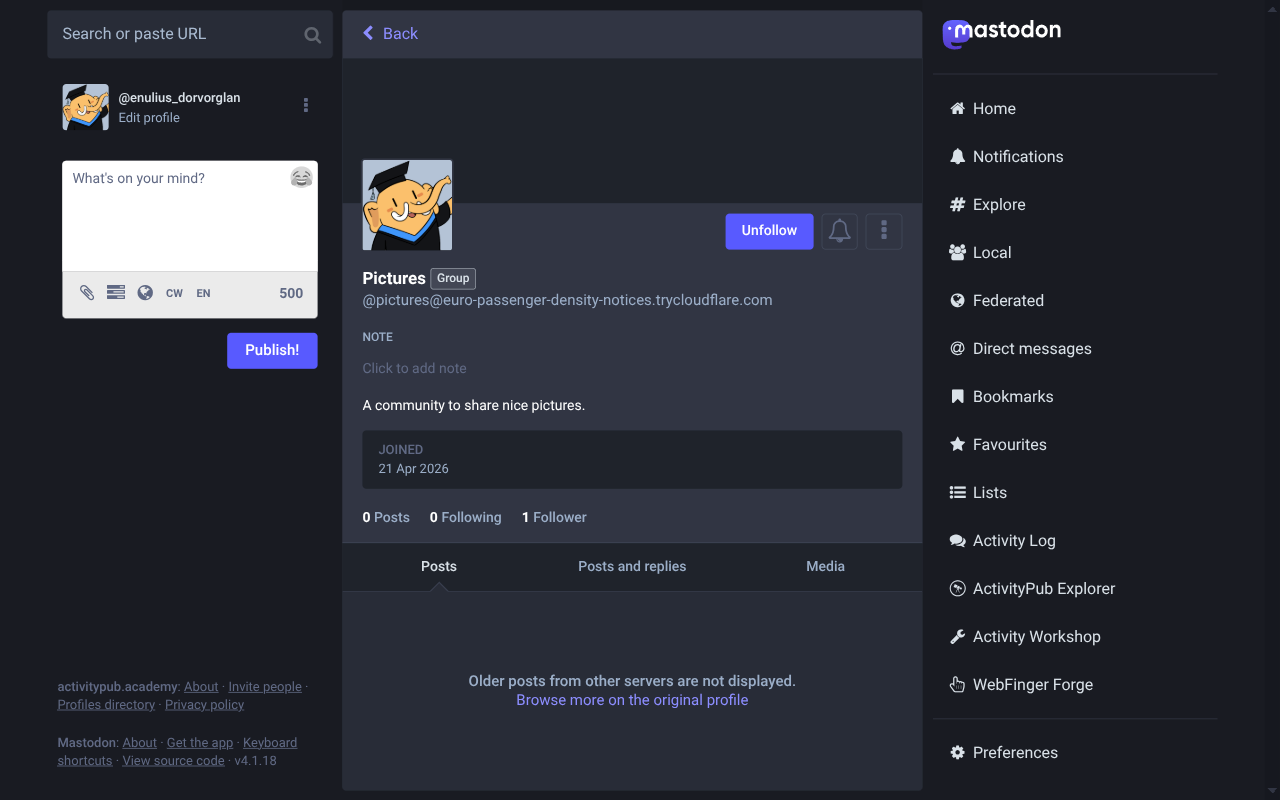
The “Group” badge, the Unfollow button (Academy has decided our Accept came back), and the 1 Follower count prove that the round trip worked: Academy sent a Follow, the community inbox accepted and recorded it, the Accept shipped back, and Academy trusts the relationship. A direct peek at the local database confirms it:
echo 'SELECT follower_uri, accepted FROM follows;' \
  | sqlite3 threadiverse.sqlite3 -header -box
Outbound follows work the same way. Log in as a local user, open /follow, paste @fediverse@lemmy.ml (or any community on an instance you like), submit the form, and wait a moment: the follow row is inserted immediately, and flips to accepted = 1 once the remote server's Accept(Follow) reaches our inbox.
Threads
With users and communities wired up on both sides, we can start carrying the actual content: discussion threads. In threadiverse federation a thread is a Page object wrapped in a Create activity sent from the author to the community. The community inbox stores the thread and redistributes it to its subscribers as an Announce(Create(Page)). The subscribers' inboxes then unwrap the Announce and route the inner Create to their own Create handler, which persists the thread. One pattern, two directions.
The threads table
Add a threads table to db/schema.ts. Like keys and follows, it uses ActivityPub URIs instead of local foreign keys so the same row shape works for threads posted locally and threads we receive via federation:
export const threads = sqliteTable("threads", {
  id: integer("id").primaryKey({ autoIncrement: true }),
  uri: text("uri").notNull().unique(),
  communityUri: text("community_uri").notNull(),
  authorUri: text("author_uri").notNull(),
  title: text("title").notNull(),
  content: text("content").notNull().default(""),
  createdAt: integer("created_at", { mode: "timestamp" })
    .notNull()
    .default(sql`(unixepoch())`),
});

export type Thread = typeof threads.$inferSelect;
export type NewThread = typeof threads.$inferInsert;
The uri column has a UNIQUE constraint so onConflictDoNothing() can be used everywhere threads get persisted. Re-run npm run db:push.
Creation form
Create a form at app/users/[username]/new-thread/page.tsx that's scoped to a single community:
import { eq } from "drizzle-orm";
import { notFound, redirect } from "next/navigation";
import { communities, db } from "@/db";
import { getCurrentUser } from "@/lib/session";
import { createThread } from "./actions";

type NewThreadPageProps = {
  params: Promise<{ username: string }>;
  searchParams: Promise<{ error?: string }>;
};

export default async function NewThreadPage({
  params,
  searchParams,
}: NewThreadPageProps) {
  const { username: slug } = await params;
  const user = await getCurrentUser();
  if (!user) redirect("/login?message=Log+in+to+start+a+thread");

  const community = db
    .select()
    .from(communities)
    .where(eq(communities.slug, slug))
    .get();
  if (!community) notFound();

  const { error } = await searchParams;
  return (
    <>
      <h1>New thread in !{community.slug}</h1>
      {error && <p className="muted">{error}</p>}
      <form action={createThread.bind(null, slug)}>
        <label>
          Title
          <input type="text" name="title" required maxLength={200} />
        </label>
        <label>
          Body
          <textarea name="content" rows={8} />
        </label>
        <button type="submit">Post thread</button>
      </form>
    </>
  );
}
NOTE
createThread.bind(null, slug) is JavaScript's standard way of partially applying a function. It produces a new function whose first argument (the slug) is fixed; the <form action> handler supplies the remaining formData. Server actions are ordinary functions, so bind works on them like any other.
And wire up the list of threads on the community page so new rows show up after redirect. Extend the existing app/users/[username]/page.tsx to query threads for the community URI and render them in a simple card list, plus a Start a thread CTA visible to logged-in users:
import { desc, eq } from "drizzle-orm";
import Link from "next/link";
import { notFound } from "next/navigation";
import { communities, db, threads, users } from "@/db";
import { currentOrigin } from "@/lib/origin";
import { getCurrentUser } from "@/lib/session";
type ProfilePageProps = {
params: Promise<{ username: string }>;
};
export default async function ProfilePage({ params }: ProfilePageProps) {
const { username: identifier } = await params;
const user = db
.select({
id: users.id,
username: users.username,
createdAt: users.createdAt,
})
.from(users)
.where(eq(users.username, identifier))
.get();
if (user) {
return (
<>
<h1>@{user.username}</h1>
<p className="muted">
Joined{" "}
{user.createdAt.toLocaleDateString("en-US", {
year: "numeric",
month: "long",
day: "numeric",
})}
</p>
<p>Threads and replies by this user will appear here.</p>
</>
);
}
const community = db
.select()
.from(communities)
.where(eq(communities.slug, identifier))
.get();
if (community) {
const currentUser = await getCurrentUser();
const origin = await currentOrigin();
const communityUri = new URL(`/users/${identifier}`, origin).href;
const threadRows = db
.select({
id: threads.id,
uri: threads.uri,
title: threads.title,
authorUri: threads.authorUri,
createdAt: threads.createdAt,
})
.from(threads)
.where(eq(threads.communityUri, communityUri))
.orderBy(desc(threads.createdAt))
.all();
Publishing a Create(Page)
The server action does two things: insert the row locally, and federate a Create(Page) to the community. Write app/users/[username]/new-thread/actions.ts:
"use server";

import { Create, Page, PUBLIC_COLLECTION } from "@fedify/vocab";
import { eq } from "drizzle-orm";
import { redirect } from "next/navigation";
import { communities, db, threads } from "@/db";
import federation from "@/federation";
import { currentOrigin } from "@/lib/origin";
import { getCurrentUser } from "@/lib/session";

export async function createThread(
  slug: string,
  formData: FormData,
): Promise<void> {
  const user = await getCurrentUser();
  if (!user) redirect("/login?message=Log+in+to+start+a+thread");

  const community = db
    .select()
    .from(communities)
    .where(eq(communities.slug, slug))
    .get();
  if (!community) redirect(`/users/${slug}?error=No+such+community`);

  const title = String(formData.get("title") ?? "").trim();
  const content = String(formData.get("content") ?? "").trim();
  if (!title) redirect(`/users/${slug}/new-thread?error=Title+is+required`);

  const origin = await currentOrigin();
  const ctx = federation.createContext(origin, undefined);
  const communityActorUri = ctx.getActorUri(slug);
  const communityFollowersUri = ctx.getFollowersUri(slug);
  const authorUri = ctx.getActorUri(user.username);
  const published = new Date();

  const inserted = db
    .insert(threads)
    .values({
      uri: `urn:threadiverse:pending:${Date.now()}`,
      communityUri: communityActorUri.href,
      authorUri: authorUri.href,
      title,
      content,
      createdAt: published,
    })
    .returning({ id: threads.id })
    .get();

  const threadUri = new URL(`/users/${slug}/threads/${inserted.id}`, origin);
  db.update(threads)
    .set({ uri: threadUri.href })
    .where(eq(threads.id, inserted.id))
    .run();

  const page = new Page({
    id: threadUri,
    name: title,
    content: content || undefined,
    attribution: authorUri,
    audience: communityActorUri,
    tos: [communityActorUri],
    ccs: [PUBLIC_COLLECTION, communityFollowersUri],
  });

  await ctx.sendActivity(
    { identifier: user.username },
    {
      id: communityActorUri,
      inboxId: ctx.getInboxUri(slug),
      endpoints: { sharedInbox: ctx.getInboxUri() },
    },
    new Create({
      id: new URL("#create", threadUri),
      actor: authorUri,
      object: page,
      tos: [communityActorUri],
      ccs: [PUBLIC_COLLECTION, communityFollowersUri],
    }),
  );

  redirect(`/users/${slug}`);
}
A few things to notice:
- The thread is inserted with a placeholder
urn:threadiverse:pending:*URI so we can get the row'sidback fromreturning; then we build the canonicalthreadUrifrom that id and update the row. We can't compute the URI before inserting because we don't know the id yet. - The
Pageobject declares the thread:attribution(author),audience(community),to(community),cc(public + community followers). That's the conventional threadiverse audience pattern. - We pass a plain recipient object (
{ id, inboxId, endpoints }) tosendActivityinstead of looking up the community actor again. For the local case we already know the URIs, and skipping the extra HTTP lookup avoids a pointless loopback.
Community-side: Create handler and Announce fan-out
Now the inbox side. When the Create lands in the community inbox, the community persists the thread and re-announces it to all its followers. Extend federation/index.ts setInboxListeners():
  .on(Create, async (ctx, create) => {
    if (!create.actorId) return;
    const object = await create.getObject(ctx);
    if (!(object instanceof Page)) return;
    if (!object.id) return;

    const communityUri = object.audienceId ?? create.toIds[0];
    if (!communityUri) return;

    db.insert(threads)
      .values({
        uri: object.id.href,
        communityUri: communityUri.href,
        authorUri: create.actorId.href,
        title: object.name?.toString() ?? "(untitled)",
        content: object.content?.toString() ?? "",
        createdAt: object.published
          ? new Date(object.published.epochMilliseconds)
          : new Date(),
      })
      .onConflictDoNothing()
      .run();

    const parsed = ctx.parseUri(communityUri);
    if (parsed?.type !== "actor") return;
    const localCommunity = db
      .select({ slug: communities.slug })
      .from(communities)
      .where(eq(communities.slug, parsed.identifier))
      .get();
    if (!localCommunity) return;

    await ctx.sendActivity(
      { identifier: parsed.identifier },
      "followers",
      new Announce({
        id: new URL(
          `#announce/${encodeURIComponent(object.id.href)}`,
          communityUri,
        ),
        actor: communityUri,
        object: create,
        tos: [ctx.getFollowersUri(parsed.identifier)],
        ccs: [PUBLIC_COLLECTION],
      }),
      { preferSharedInbox: true },
    );
  })
Important details:
- The handler works both for directly-delivered Creates (our own user posted) and for Creates pulled out of an Announce (a follower of a remote community). In the first case the community is local, so we Announce. In the second case
localCommunityis null, the handler returns early, and the thread is just stored. onConflictDoNothing()on the insert is what keeps optimistic local inserts (from the Create action above) and the inbox insert from stepping on each other: the URI is the same, so the second insert is a no-op.sendActivity(..., "followers", ...)resolves to thesetFollowersDispatcherwe wrote in Subscribing to communities, giving Fedify the list of recipient inboxes.preferSharedInbox: truecollapses delivery to each host's shared inbox instead of per-actor inboxes when possible.
Follower-side: Announce router
The mirror half: when a follower receives Announce(Create(Page)) from a community, we unwrap the Announce and let the same Create handler store the thread. ctx.routeActivity is the right tool: it verifies the enclosed activity's signature (it must either be signed by its actor or come from its actor's origin) before routing, so a malicious Announce can't smuggle in a fake thread:
  .on(Announce, async (ctx, announce) => {
    const object = await announce.getObject(ctx);
    if (object instanceof Activity) {
      await ctx.routeActivity(ctx.recipient, object);
    }
  });
That's it. With the Announce listener in place, the same Create handler that stored a locally-originated thread now also stores threads that flow in via federation.
Testing
There are three useful end-to-end tests for this chapter:
Local only. In one browser tab, log in as
alice, create a community and post a thread in it. Refresh the community page; the thread appears in the list. Thethreadstable has one row whoseuriis a full absolute URL, whosecommunity_urimatches the actor URI of the community, and whoseauthor_urimatches the actor URI of the logged-in user.Local community federates outbound. Have ActivityPub.Academy follow your local community (repeating the Subscribing to communities test), then create another thread. Mastodon-family servers (Academy included) don't render
Pageobjects in their timelines (that's a Mastodon limitation, not a bug), but your community's outbound Announce is still enqueued and delivered. You can see the outbound HTTP signatures in your dev server logs.Remote community federates inbound. Find a real Lemmy community (for example
!fediverse@lemmy.ml), open the/followpage, and subscribe. Once Lemmy accepts the follow, any post that community makes from that point on appears in yourthreadstable within a few seconds of the poster hitting publish on the Lemmy side.
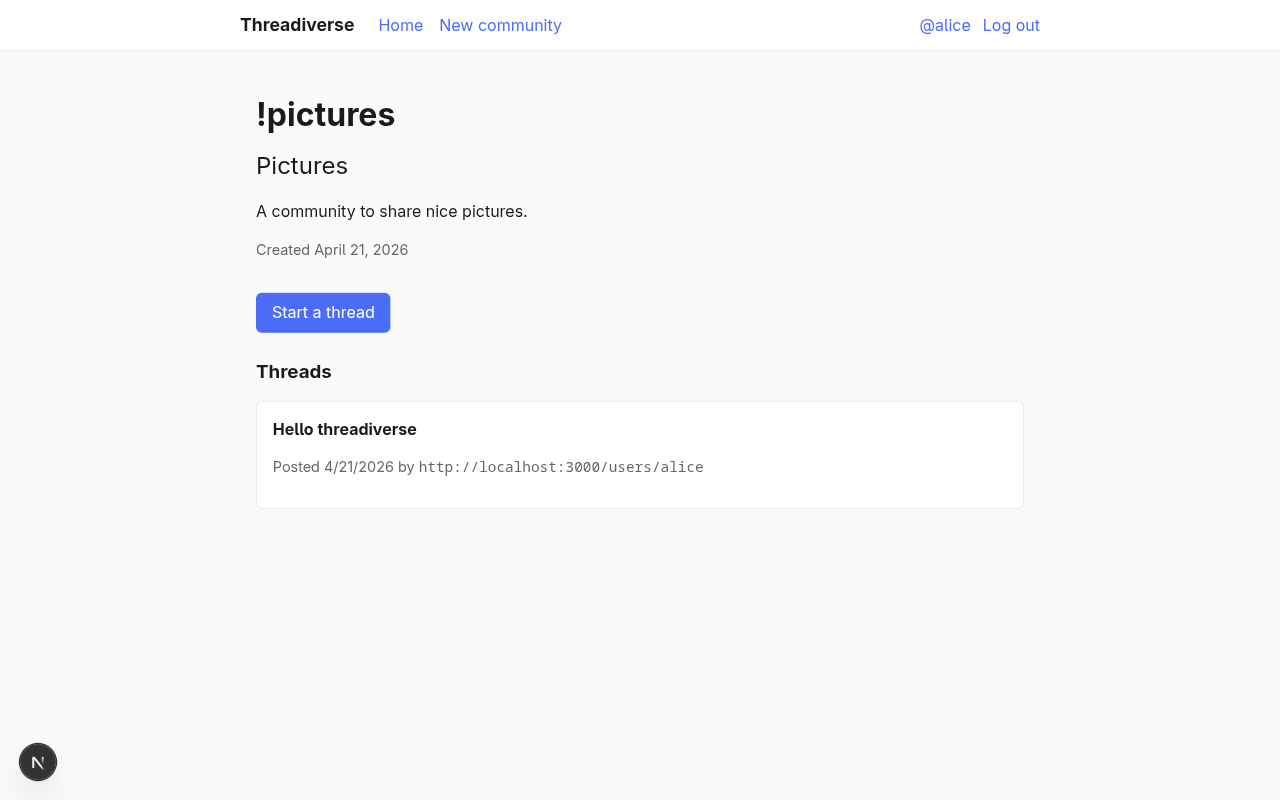
TIP
To test case 3, paste a Lemmy community handle into the /follow form, then watch the dev server logs for an inbound Announce(Create(Page)). If nothing arrives, check that your tunnel is still up (Cloudflare Tunnel in particular will keep cloudflared running after the connection drops silently) and that the Lemmy community actually has new posts.
Replies
A thread without replies is just an announcement. In this chapter we add nested replies, federated as Create(Note) activities with an inReplyTo pointing at either the thread itself or another reply. The community re-announces them exactly like it does threads, and the same Announce → routeActivity → Create machinery we already have will fan replies out to subscribers without any new plumbing.
Thread page
Before we can reply to a thread, the thread needs a dedicated page of its own. Create app/users/[username]/threads/[id]/page.tsx:
import { eq } from "drizzle-orm";
import { notFound } from "next/navigation";
import { communities, db, threads } from "@/db";
import { currentOrigin } from "@/lib/origin";

type ThreadPageProps = {
  params: Promise<{ username: string; id: string }>;
};

export default async function ThreadPage({ params }: ThreadPageProps) {
  const { username: slug, id: idParam } = await params;
  const community = db
    .select()
    .from(communities)
    .where(eq(communities.slug, slug))
    .get();
  if (!community) notFound();

  const origin = await currentOrigin();
  const threadUri = new URL(`/users/${slug}/threads/${idParam}`, origin).href;

  const thread = db
    .select()
    .from(threads)
    .where(eq(threads.uri, threadUri))
    .get();
  if (!thread) notFound();

  return (
    <>
      <p className="muted">
        In <a href={`/users/${slug}`}>!{slug}</a>
      </p>
      <h1>{thread.title}</h1>
      <p className="muted">
        Posted {thread.createdAt.toLocaleString("en-US")} by{" "}
        <code>{thread.authorUri}</code>
      </p>
      {thread.content && (
        <div className="card">
          <p style={{ whiteSpace: "pre-wrap", margin: 0 }}>{thread.content}</p>
        </div>
      )}
      <p className="muted">Replies will appear here in the next commit.</p>
    </>
  );
}
Also turn the thread titles on the community page into <Link>s pointing at the new route.
The replies table
Add the table to db/schema.ts:
export const replies = sqliteTable("replies", {
  id: integer("id").primaryKey({ autoIncrement: true }),
  uri: text("uri").notNull().unique(),
  threadUri: text("thread_uri").notNull(),
  parentUri: text("parent_uri"),
  communityUri: text("community_uri").notNull(),
  authorUri: text("author_uri").notNull(),
  content: text("content").notNull(),
  createdAt: integer("created_at", { mode: "timestamp" })
    .notNull()
    .default(sql`(unixepoch())`),
});

export type Reply = typeof replies.$inferSelect;
export type NewReply = typeof replies.$inferInsert;
thread_uri is always set; parent_uri is null for direct replies to a thread or set to another reply's URI for nested replies. community_uri is denormalised into the reply so community-side Announce delivery doesn't need to walk back through threads.
npm run db:push.
Reply form and tree rendering
Flesh out the thread page to render the reply tree and offer inline reply forms. Replace app/users/[username]/threads/[id]/page.tsx with the full version (links, reply tree, nested reply forms). See the matching example commit for the complete source; the two interesting bits are the recursive render and the buildReplyTree helper that turns a flat list of rows into a nested tree using parent_uri.
Recursive render:
function ReplyList({ nodes, slug, threadId, user }) {
  return (
    <ul className="reply-tree">
      {nodes.map((node) => (
        <li key={node.id}>
          <div className="card">
            {/* author, timestamp, content */}
            {user && (
              <details>
                <summary className="muted">Reply</summary>
                <form action={createReply.bind(null, slug, threadId)}>
                  <input type="hidden" name="parentUri" value={node.uri} />
                  <textarea name="content" rows={3} required />
                  <button type="submit">Post reply</button>
                </form>
              </details>
            )}
          </div>
          {node.children.length > 0 && (
            <ReplyList nodes={node.children} slug={slug} threadId={threadId} user={user} />
          )}
        </li>
      ))}
    </ul>
  );
}buildReplyTree:
function buildReplyTree(rows: ReplyRow[], threadUri: string): ReplyNode[] {
  const byUri = new Map<string, ReplyNode>();
  const roots: ReplyNode[] = [];
  for (const row of rows) {
    byUri.set(row.uri, { ...row, children: [] });
  }
  for (const node of byUri.values()) {
    const parent = node.parentUri ? byUri.get(node.parentUri) : undefined;
    if (parent) parent.children.push(node);
    else roots.push(node);
  }
  return roots;
}
The reply-tree CSS class (already in the stylesheet you copied in the layout chapter) gives nested lists a 1.5rem indent and a left border so the tree reads visually.
Server action for replies
Write app/users/[username]/threads/[id]/actions.ts:
"use server";

import { Create, Note, PUBLIC_COLLECTION } from "@fedify/vocab";
import { eq } from "drizzle-orm";
import { redirect } from "next/navigation";
import { communities, db, replies, threads } from "@/db";
import federation from "@/federation";
import { currentOrigin } from "@/lib/origin";
import { getCurrentUser } from "@/lib/session";

export async function createReply(
  slug: string,
  threadId: string,
  formData: FormData,
): Promise<void> {
  // 1. Authenticate and resolve the thread.
  // 2. Insert the reply optimistically with a placeholder URI,
  //    then update the row with the canonical reply URL.
  // 3. Build and send a Create(Note) addressed to the community,
  //    with `replyTarget` set to either the parent reply URI
  //    (nested reply) or the thread URI (top-level reply).
}
(The microblog-style full listing is in the paired commit.)
The important structural detail is that the reply URI uses /users/<slug>/threads/<threadId>/replies/<replyId>; keeping replies namespaced under their thread is just a convention, but it means the URI already encodes enough to find the reply's context without a separate index.
Community-side: Create(Note) handler
Teach the existing Create handler in federation/index.ts to also accept Note objects. The inline diff against the previous version:
.on(Create, async (ctx, create) => {
  if (!create.actorId) return;
  const object = await create.getObject(ctx);
  if (!object?.id) return;

  let communityUri: URL | null = null;

  if (object instanceof Page) {
    // (existing thread branch)
  } else if (object instanceof Note) {
    communityUri = object.audienceId ?? create.toIds[0] ?? null;
    const inReplyTo = object.replyTargetId;
    if (!communityUri || !inReplyTo) return;
    // Look the parent up in `threads` first, then in `replies`,
    // to derive the top-level `thread_uri` for the row.
    const parentThread = db
      .select({ uri: threads.uri })
      .from(threads)
      .where(eq(threads.uri, inReplyTo.href))
      .get();
    const parentReply = parentThread
      ? null
      : db
          .select({ uri: replies.uri, threadUri: replies.threadUri })
          .from(replies)
          .where(eq(replies.uri, inReplyTo.href))
          .get();
    const threadUri = parentThread?.uri ?? parentReply?.threadUri;
    if (!threadUri) return;
    db.insert(replies)
      .values({
        uri: object.id.href,
        threadUri,
        parentUri: parentReply ? inReplyTo.href : null,
        communityUri: communityUri.href,
        authorUri: create.actorId.href,
        content: object.content?.toString() ?? "",
        createdAt: object.published
          ? new Date(object.published.epochMilliseconds)
          : new Date(),
      })
      .onConflictDoNothing()
      .run();
  } else {
    return;
  }

  // ...then the same "is this community local?" + Announce branch
  // as the thread handler, unchanged.
});
The rest of the handler (the local-community check and the sendActivity(..., "followers", Announce(Create)) fan-out) is shared between threads and replies, so the community Announces threads and replies exactly the same way.
Testing
Log in as two different local users in different browser sessions (or use private-window isolation). One user posts a thread, the other replies to it. Both reply forms (top-level and nested) should insert a row in replies and leave the dev server's Fedify pipeline carrying a Create(Note) → Announce(Create(Note)) pair to every subscriber of the community.
Votes (Like and Dislike)
Threadiverse platforms let users up-vote and down-vote threads and replies to sort them. ActivityPub already has two activity types that match exactly: Like and Dislike. We federate them the same way we federate threads and replies: voter → community → Announce to followers.
The votes table
export const votes = sqliteTable(
  "votes",
  {
    id: integer("id").primaryKey({ autoIncrement: true }),
    uri: text("uri").notNull().unique(),
    voterUri: text("voter_uri").notNull(),
    targetUri: text("target_uri").notNull(),
    kind: text("kind", { enum: ["Like", "Dislike"] }).notNull(),
    communityUri: text("community_uri").notNull(),
    createdAt: integer("created_at", { mode: "timestamp" })
      .notNull()
      .default(sql`(unixepoch())`),
  },
  (table) => [
    uniqueIndex("votes_voter_target_idx").on(table.voterUri, table.targetUri),
  ],
);

export type Vote = typeof votes.$inferSelect;
The (voter_uri, target_uri) unique index gives each voter exactly one current vote per target. Switching from Like to Dislike is an upsert that updates kind in place, so a voter's two activity URIs don't leave two vote rows behind.
Run npm run db:push to create the table.
Vote buttons on the thread page
Add ▲ and ▼ buttons to the thread page next to each thread and each reply. Inside app/users/[username]/threads/[id]/page.tsx, declare a small VoteTally type and, before rendering, query every vote for every target on the page in a single inArray query and fold the rows into a Map<targetUri, VoteTally>:
type VoteTally = {
  likes: number;
  dislikes: number;
  myVote: "Like" | "Dislike" | null;
};

const voteTargets = [threadUri, ...replyRows.map((r) => r.uri)];
const voteRows = db
  .select()
  .from(votes)
  .where(inArray(votes.targetUri, voteTargets))
  .all();
const myVoterUri = user
  ? new URL(`/users/${user.username}`, origin).href
  : null;
const tallies = new Map<string, VoteTally>();
for (const v of voteRows) {
  const t = tallies.get(v.targetUri) ?? {
    likes: 0, dislikes: 0, myVote: null,
  };
  if (v.kind === "Like") t.likes++;
  else t.dislikes++;
  if (v.voterUri === myVoterUri) t.myVote = v.kind;
  tallies.set(v.targetUri, t);
}
Still in app/users/[username]/threads/[id]/page.tsx, define a small <VoteButtons> component that renders two forms, each a one-shot that POSTs to the server action we'll write next:
<div style={{ display: "flex", gap: "0.5rem" }}>
  <form action={castVote.bind(null, slug, threadId)}>
    <input type="hidden" name="targetUri" value={targetUri} />
    <input type="hidden" name="kind" value="Like" />
    <button
      type="submit"
      className={mine === "Like" ? "" : "link-button"}
    >
      ▲ {likes}
    </button>
  </form>
  <form action={castVote.bind(null, slug, threadId)}>
    <input type="hidden" name="targetUri" value={targetUri} />
    <input type="hidden" name="kind" value="Dislike" />
    <button
      type="submit"
      className={mine === "Dislike" ? "" : "link-button"}
    >
      ▼ {dislikes}
    </button>
  </form>
</div>
The solid accent colour (button default) marks the user's active vote; the un-voted side renders with the link-button class so it looks like a muted link until the user commits to it.
Outbound: castVote action
Create app/users/[username]/threads/[id]/vote-actions.ts with the server action that publishes a Like or Dislike activity and optimistically records the vote locally:
"use server";

import { Dislike, Like, PUBLIC_COLLECTION } from "@fedify/vocab";
import { eq } from "drizzle-orm";
import { redirect } from "next/navigation";
import { communities, db, votes } from "@/db";
import federation from "@/federation";
import { currentOrigin } from "@/lib/origin";
import { getCurrentUser } from "@/lib/session";

export async function castVote(
  slug: string,
  threadId: string,
  formData: FormData,
): Promise<void> {
  const user = await getCurrentUser();
  if (!user) redirect("/login?message=Log+in+to+vote");

  const targetUri = String(formData.get("targetUri") ?? "").trim();
  const kind = String(formData.get("kind") ?? "") as "Like" | "Dislike";
  // (...validate)

  const origin = await currentOrigin();
  const ctx = federation.createContext(origin, undefined);
  const voterUri = ctx.getActorUri(user.username);
  const communityActorUri = ctx.getActorUri(slug);
  const voteActivityUri = new URL(
    `/users/${user.username}/votes/${Date.now()}`,
    origin,
  );

  db.insert(votes)
    .values({
      uri: voteActivityUri.href,
      voterUri: voterUri.href,
      targetUri,
      kind,
      communityUri: communityActorUri.href,
    })
    .onConflictDoUpdate({
      target: [votes.voterUri, votes.targetUri],
      set: { kind, uri: voteActivityUri.href },
    })
    .run();

  const VoteClass = kind === "Like" ? Like : Dislike;
  await ctx.sendActivity(
    { identifier: user.username },
    { id: communityActorUri, inboxId: ctx.getInboxUri(slug),
      endpoints: { sharedInbox: ctx.getInboxUri() } },
    new VoteClass({
      id: voteActivityUri,
      actor: voterUri,
      object: new URL(targetUri),
      audience: communityActorUri,
      tos: [communityActorUri],
      ccs: [PUBLIC_COLLECTION, ctx.getFollowersUri(slug)],
    }),
  );

  redirect(`/users/${slug}/threads/${threadId}`);
}
Two important bits:
const VoteClass = kind === "Like" ? Like : Dislike;+new VoteClass(...)— both activity classes have the same field shape, so constructing them generically is just a conditional.ccs: [PUBLIC_COLLECTION, ctx.getFollowersUri(slug)]— even though a vote is sent to a specific community, adding the followers collection as acckeeps the activity's audience consistent with how we addressed threads and replies.
Inbox: Like / Dislike handlers with re-Announce
The community side does the same pattern as threads and replies: upsert the vote, then re-Announce if the community is local. Both Like and Dislike go through one shared function:
federation
  .setInboxListeners("/users/{identifier}/inbox", "/inbox")
  // ...Follow, Accept, Create, Announce listeners from before...
  .on(Like, async (ctx, like) => {
    await handleVote(ctx, like, "Like");
  })
  .on(Dislike, async (ctx, dislike) => {
    await handleVote(ctx, dislike, "Dislike");
  });

async function handleVote(
  ctx: InboxContext<unknown>,
  activity: Like | Dislike,
  kind: "Like" | "Dislike",
): Promise<void> {
  if (!activity.id || !activity.actorId || !activity.objectId) return;
  const targetUri = activity.objectId.href;
  const communityUri = activity.audienceId ?? activity.toIds[0] ?? null;
  if (!communityUri) return;

  // Only accept votes on known threads or replies.
  const targetThread = db
    .select({ uri: threads.uri })
    .from(threads)
    .where(eq(threads.uri, targetUri))
    .get();
  const targetReply = targetThread
    ? null
    : db
        .select({ uri: replies.uri })
        .from(replies)
        .where(eq(replies.uri, targetUri))
        .get();
  if (!targetThread && !targetReply) return;

  db.insert(votes)
    .values({
      uri: activity.id.href,
      voterUri: activity.actorId.href,
      targetUri,
      kind,
      communityUri: communityUri.href,
    })
    .onConflictDoUpdate({
      target: [votes.voterUri, votes.targetUri],
      set: { kind, uri: activity.id.href },
    })
    .run();

  const parsed = ctx.parseUri(communityUri);
  if (parsed?.type !== "actor") return;
  const localCommunity = db
    .select({ slug: communities.slug })
    .from(communities)
    .where(eq(communities.slug, parsed.identifier))
    .get();
  if (!localCommunity) return;

  await ctx.sendActivity(
    { identifier: parsed.identifier },
    "followers",
    new Announce({
      id: new URL(
        `#announce/${encodeURIComponent(activity.id.href)}`,
        communityUri,
      ),
      actor: communityUri,
      object: activity,
      tos: [ctx.getFollowersUri(parsed.identifier)],
      ccs: [PUBLIC_COLLECTION],
    }),
    { preferSharedInbox: true },
  );
}
There's no new inbox plumbing for subscribers: the Announce listener we already have routeActivitys the inner Like / Dislike right back through this same handler, and handleVote short-circuits the re-Announce branch when the community is remote. One function, two directions.
TIP
Threadiverse servers score threads with signed integer sums like likes - dislikes. A ranking query is just SELECT target_uri, SUM(CASE kind WHEN 'Like' THEN 1 ELSE -1 END) AS score FROM votes GROUP BY target_uri. We keep the vote rows rather than a pre-aggregated counter so ranking algorithms can be added later without a schema migration.
Putting it together: the subscribed feed
Every feature so far (Person/Group actors, Follow/Accept/Undo, Create(Page), Create(Note), Like, Dislike) has moved a row into or out of one of our tables. The home page is where those rows become something the reader actually sees: a chronological feed of every thread from every community they subscribe to.
Rewrite app/page.tsx to branch on the viewer:
import { desc, eq, inArray } from "drizzle-orm";
import Link from "next/link";
import { db, follows, threads } from "@/db";
import { currentOrigin } from "@/lib/origin";
import { getCurrentUser } from "@/lib/session";
import { unfollowCommunity } from "./unfollow/actions";

export default async function Home() {
  const user = await getCurrentUser();
  if (!user) {
    return (
      <>
        <h1>Welcome to Threadiverse</h1>
        <p>A small federated community platform built with Fedify and Next.js.</p>
        <p>
          <Link href="/signup" className="button">Sign up</Link>{" "}
          <Link href="/login">or log in</Link>.
        </p>
      </>
    );
  }

  const origin = await currentOrigin();
  const viewerUri = new URL(`/users/${user.username}`, origin).href;

  const subscribed = db
    .select({ followedUri: follows.followedUri, accepted: follows.accepted })
    .from(follows)
    .where(eq(follows.followerUri, viewerUri))
    .all();
  const subscribedUris = subscribed
    .filter((r) => r.accepted)
    .map((r) => r.followedUri);

  const feed = subscribedUris.length === 0 ? [] : db
    .select()
    .from(threads)
    .where(inArray(threads.communityUri, subscribedUris))
    .orderBy(desc(threads.createdAt))
    .limit(30)
    .all();

  return (
    <>
      <h1>Your feed</h1>
      {/* subscriptions list + feed rendering: see the paired commit */}
    </>
  );
}
The inArray(threads.communityUri, subscribedUris) query is the important bit: it turns the list of accepted follow rows into a single SQL IN (…) predicate, so fetching the feed is one roundtrip regardless of how many communities the user subscribes to.
Unsubscribing with Undo(Follow)
The subscriptions list on the home page includes an Unfollow button per community. Unsubscribing is essentially the Subscribing to communities follow flow played backwards.
Outbound: unfollowCommunity
"use server";

import { Follow, Undo } from "@fedify/vocab";
import { and, eq } from "drizzle-orm";
import { redirect } from "next/navigation";
import { db, follows } from "@/db";
import federation from "@/federation";
import { currentOrigin } from "@/lib/origin";
import { getCurrentUser } from "@/lib/session";

export async function unfollowCommunity(formData: FormData): Promise<void> {
  const user = await getCurrentUser();
  if (!user) redirect("/login");

  const followedUri = String(formData.get("followedUri") ?? "").trim();
  if (!followedUri) redirect("/");

  const origin = await currentOrigin();
  const ctx = federation.createContext(origin, undefined);
  const followerUri = ctx.getActorUri(user.username);

  const row = db
    .select()
    .from(follows)
    .where(and(
      eq(follows.followerUri, followerUri.href),
      eq(follows.followedUri, followedUri),
    ))
    .get();
  if (!row) redirect("/");

  const undoActivityUri = new URL(
    `/users/${user.username}/undoes/${Date.now()}`, origin,
  );

  await ctx.sendActivity(
    { identifier: user.username },
    { id: new URL(followedUri), inboxId: new URL(row.followerInbox) },
    new Undo({
      id: undoActivityUri,
      actor: followerUri,
      object: new Follow({
        id: new URL(`#follow-undo/${row.id}`, followerUri),
        actor: followerUri,
        object: new URL(followedUri),
      }),
    }),
  );

  db.delete(follows).where(and(
    eq(follows.followerUri, followerUri.href),
    eq(follows.followedUri, followedUri),
  )).run();

  redirect("/");
}
A few subtle bits:
- The enclosed
Followinside theUndodoesn't have to be the exact original Follow (we don't necessarily remember its URI); it only needs to have the sameactor+objectso the receiving server can match it against its own record. - The recipient is built by hand with the followee's URI as
idand the follower's inbox URL (which we stored when the follow was first inserted). That's sufficient forsendActivitywithout another network lookup. - We ship the Undo before deleting the local row. If delivery fails, the follow stays in the table and the user can try again.
Inbound: Undo handler
When a remote actor Undoes a Follow directed at one of our communities, we need to remove the row:
  .on(Undo, async (ctx, undo) => {
    const enclosed = await undo.getObject(ctx);
    if (!(enclosed instanceof Follow)) return;
    if (!enclosed.actorId || !enclosed.objectId) return;
    if (undo.actorId?.href !== enclosed.actorId.href) return;
    db.delete(follows)
      .where(
        and(
          eq(follows.followerUri, enclosed.actorId.href),
          eq(follows.followedUri, enclosed.objectId.href),
        ),
      )
      .run();
  })
The undo.actorId?.href !== enclosed.actorId.href check is the authorization: you can only Undo your own Follow, not someone else's. Fedify already verifies the Undo's HTTP signature, so undo.actorId is trustworthy; we rely on that plus an explicit actor-equality check to defend the row.
Testing
Follow your local community from ActivityPub.Academy (same as in Subscribing to communities), open the Academy community profile, and hit Unfollow. A few seconds later your follows table has zero rows for the @enulius_dorvorglan@activitypub.academy actor. Inversely, log in as a local user, expand the Subscriptions section on the home page, and click Unfollow next to a remote community; the row disappears from your table and, once the remote server processes the Undo, from their member count too.
Making the community actor Lemmy-compatible
The actor JSON we've built so far is enough for Mastodon-family software to find our community through WebFinger and show it as a Group, but Lemmy is stricter. When a Lemmy user subscribes to !pictures@host, Lemmy's community parser checks for three fields that Mastodon doesn't require and rejects the actor silently if they're missing. Adding them is a small edit to federation/index.ts, and doesn't need any schema change.
attributedTo pointing at a moderators collection
Lemmy expects every Group to expose its moderator list via an attributedTo URL pointing at a collection of Person actors. We model that with Fedify's setCollectionDispatcher. Register a new collection named moderators at /users/{identifier}/moderators that returns the community's creator as the sole moderator:
federation.setCollectionDispatcher(
  "moderators",
  Person,
  "/users/{identifier}/moderators",
  async (ctx, { identifier }) => {
    const row = db
      .select({ username: users.username })
      .from(communities)
      .innerJoin(users, eq(users.id, communities.creatorId))
      .where(eq(communities.slug, identifier))
      .get();
    if (!row) return null;
    return {
      items: [new Person({ id: ctx.getActorUri(row.username) })],
    };
  },
);
The callback's second argument destructures the {identifier} variable out of the route template. ctx.getActorUri(row.username) reuses the user's existing actor URI so remote servers don't need a second WebFinger lookup to resolve the moderator.
featured for pinned posts
Lemmy also demands a featured URL. It's the equivalent of Mastodon's pinned posts but threadiverse servers rarely pin anything; an empty OrderedCollection is enough to pass Lemmy's check. Use Fedify's built-in setFeaturedDispatcher:
federation.setFeaturedDispatcher(
  "/users/{identifier}/featured",
  async (_ctx, _identifier) => ({ items: [] }),
);
Wiring the two into the Group actor
Finally, add attribution (which serialises as attributedTo) and featured to the Group we return from setActorDispatcher:
return new Group({
  id: ctx.getActorUri(identifier),
  preferredUsername: identifier,
  name: community.name,
  summary: community.description || undefined,
  inbox: ctx.getInboxUri(identifier),
  outbox: ctx.getOutboxUri(identifier),
  endpoints: new Endpoints({ sharedInbox: ctx.getInboxUri() }),
  followers: ctx.getFollowersUri(identifier),
  featured: new URL(`/users/${identifier}/featured`, ctx.url),
  attribution: ctx.getCollectionUri("moderators", { identifier }),
  url: new URL(`/users/${identifier}`, ctx.url),
  publicKey: keyPairs[0]?.cryptographicKey,
  assertionMethods: keyPairs.map((k) => k.multikey),
});
Testing against a real Lemmy instance
Pick any Lemmy instance where you have an account and paste the community's URL straight into the address bar:
https://lemmy.ml/c/<slug>@<your-tunnel>Lemmy fetches the actor and shows a community sidebar with a Subscribe button. But clicking Subscribe still lands on Subscribe Pending: Lemmy's outbound Follow either never reaches our inbox, or our Accept(Follow) never gets past Lemmy's strict parser. One more change clears the rest.
NOTE
There used to be a second change in this chapter: Lemmy's activities include https://join-lemmy.org/context.json in their @context array, but the server returns that document as application/json without the Link: <...>; rel="http://www.w3.org/ns/json-ld#context" header Fedify's default JSON-LD loader requires, so earlier drafts of the tutorial had to ship a bundled copy of the context and wrap createFederation with a custom documentLoaderFactory. Fedify 2.1.10 preloads the Lemmy context for us, so Lemmy activities now parse without any extra configuration on the application side.
Trim the Accept(Follow) to what Lemmy accepts
Lemmy's inbox parser enforces a strict enum over activity types and refuses activities that don't match exactly. Two tiny edits to the Accept we ship back make it pass:
await ctx.sendActivity(
  { identifier },
  actor,
  new Accept({
    id: new URL(
      `/users/${identifier}/accepts/${crypto.randomUUID()}`,
      ctx.getActorUri(identifier),
    ),
    actor: follow.objectId,
    object: new Follow({
      id: follow.id,
      actor: follow.actorId,
      object: follow.objectId,
    }),
  }),
);
Two changes from the version we wrote in Subscribing to communities:
- The
iduses a UUID-based path (/users/{id}/accepts/{uuid}) instead of the URL-encoded fragment#accepts/<url-encoded follow id>. Lemmy's URL parser doesn't tolerate a URL inside a fragment. - The nested
objectis a brand-newFollowwith onlyid,actor, andobjectpopulated; Lemmy's parser balks at the full original Follow (with its own@contextand ancillary fields) that Fedify would otherwise serialise inline.
Verification
With those changes live, clicking Subscribe on the Lemmy community page flips straight to Joined, and a direct check of our database shows the row:
echo 'SELECT follower_uri, accepted FROM follows;' \
| sqlite3 threadiverse.sqlite3https://lemmy.ml/u/<your-username>|1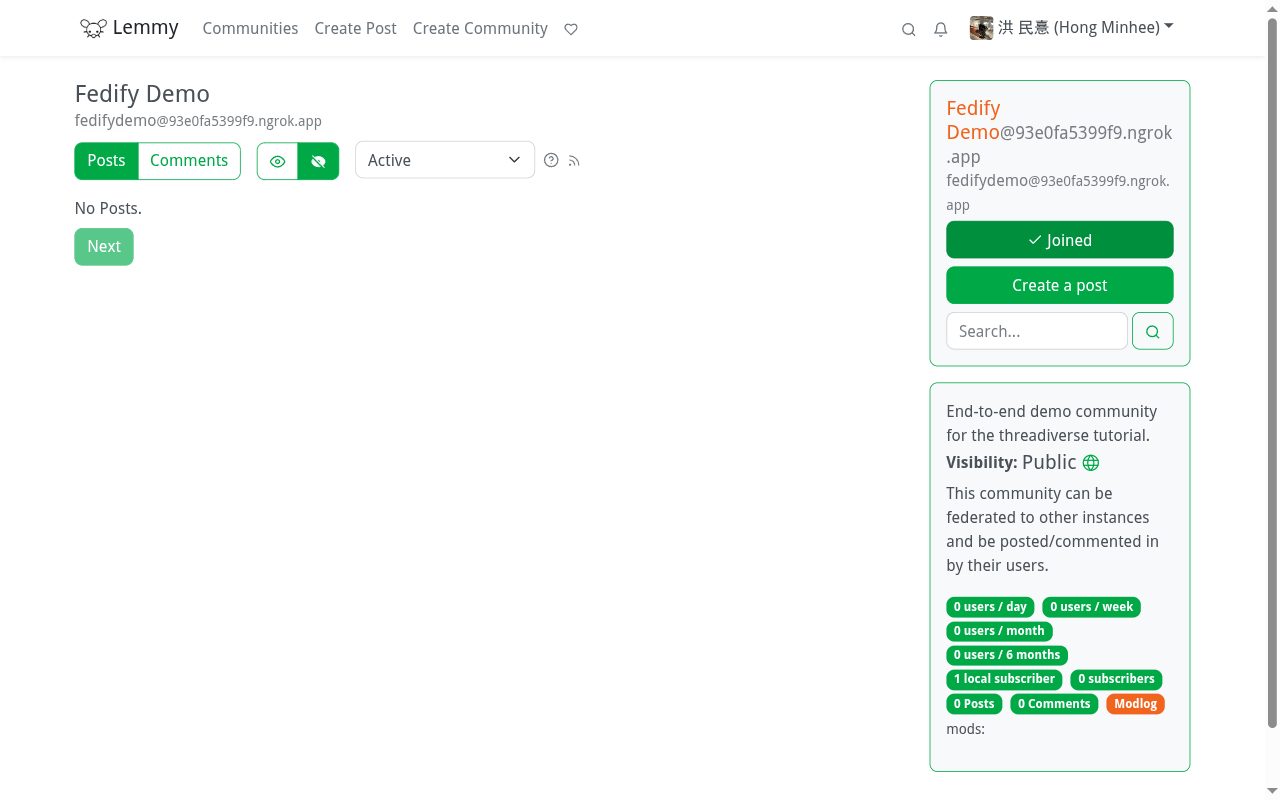
NOTE
Earlier drafts of this tutorial warned that outbound Announce(Create(Page)) (the fan-out a community does when a new thread arrives) was silently rejected by Lemmy with {"error":"object_is_not_public"}. The underlying cause was JSON-LD compaction: Fedify was emitting "to": "as:Public" in outgoing activities, and Lemmy's inbox parser compares that field against the full https://www.w3.org/ns/activitystreams#Public URI by string equality, without expanding the CURIE. Lemmy's behaviour is tracked upstream in LemmyNet/lemmy#6465 and patched in LemmyNet/lemmy#6466. Fedify 2.2 also ships the full URI form on the sender side as a broader interop workaround, since several other fediverse implementations exhibit the same gap. With both halves in place, posting a thread in a local community that a Lemmy user is subscribed to now lands in their feed, and the same path carries replies and votes back and forth.
TIP
Lemmy additionally sends a boolean postingRestrictedToMods on its own communities. Fedify's Group vocab doesn't expose that property, but Lemmy tolerates its absence in incoming actors. If you want to advertise it anyway (for example to mark your community as announcement-only) you can add the field with a custom JSON-LD context; see the Fedify vocab docs for the escape hatch.
Areas to improve
The tutorial stops here, but there's a long list of features you can add next. Each of these is a small extension of the primitives already in place:
- Link threads. The feature checklist at the top of this tutorial mentioned link posts as out of scope. The shape is small: give
threadsa nullablelink_urlcolumn, render it in the thread card, and setPage.urlwhen federating. No new activity types are required. - Editing and deletion.
Update(Page)/Update(Note)andDelete(Page)/Delete(Note)withTombstonesubstitutes. The handlers look just like the Create handler, differing only in what DB row they mutate. - Local community index. A
/communitiespage that lists everycommunitiesrow. A single select + paginate; no federation touched. - Ranking. Surface the
SUM(CASE kind WHEN 'Like' THEN 1 ELSE -1 END)tally from Votes (LikeandDislike) asscore, and sort feeds byscore * decay(created_at)for the Lemmy Active / Hot formulas. - Persistent federation state.
fedify initset us up withMemoryKvStore+InProcessMessageQueue. In production you'll want persistent versions so activity retries survive restarts; swap both in federation/index.ts forPostgresKvStore/PostgresMessageQueuefrom@fedify/postgres, orSqliteKvStore/SqliteMessageQueuefrom@fedify/sqlite. - PostgreSQL for application data. Drizzle ORM's SQLite and PostgreSQL drivers share most of the schema vocabulary, so moving from
drizzle-orm/better-sqlite3todrizzle-orm/node-postgresis largely a connection-string change plus a small column-type pass.
Next steps
If you're getting ready to put this (or a derived app) into production:
- Read the Deployment chapter of the Fedify manual end to end. Run through its sections on canonical origin, behind a reverse proxy, persistent KV store and message queue, actor key lifecycle, and running the process first. The running the process section has a Node.js recipe that matches the runtime of what we built here.
- The
@fedify/nextREADME covers the Next.js middleware's runtime constraints and the Vercel deployment caveats (Node.js runtime required; the middleware does not run on the Edge). - Join the Matrix chat or GitHub Discussions if you get stuck.
Congratulations, you've built a federated community platform from scratch using Fedify. Go spin up a tunnel, share your community handle on the fediverse, and watch threads flow in.